1. What a Multi-agent prototype lacks in production
Suppose a researcher gathers evidence, a writer drafts the report, and a reviewer approves it. A prototype already looks convincing when the researcher can hand results to the writer and the writer can send a draft to the reviewer. AutoGen is valuable because it makes this question explicit: who sends which message to whom, and what should the recipient do next?
Production introduces a different set of failures. The service restarts before approval; a user returns the next day and the system cannot find the paused task; Web, Teams, and API endpoints duplicate integration code; or a reviewer supplies feedback and the whole report starts again. The missing piece is no longer another agent. It is a runtime that records progress, pauses, resumes, and connects channels consistently.
2. Six concepts used throughout this article
Put the two generations on one map before reading class names. Every source detail later in the chapter implements one of these six ideas:
- AutoGen focuses on how multiple agents collaborate through messages, making it useful for research and conversational prototypes.
- Message runtime is the team's internal post office: it accepts messages, queues them, finds recipients, and invokes their handlers.
- Team conversation organizes researcher, writer, and reviewer by deciding who speaks, who takes over, and when the task ends.
- MAF is Microsoft's newer framework for production agents and multi-agent workflows.
- Workflow and checkpoint make steps, branches, and pauses explicit; a checkpoint is a saved point from which work can resume.
- Hosting provides AgentState and WorkflowState, which the application connects to its routes, authentication, and storage.
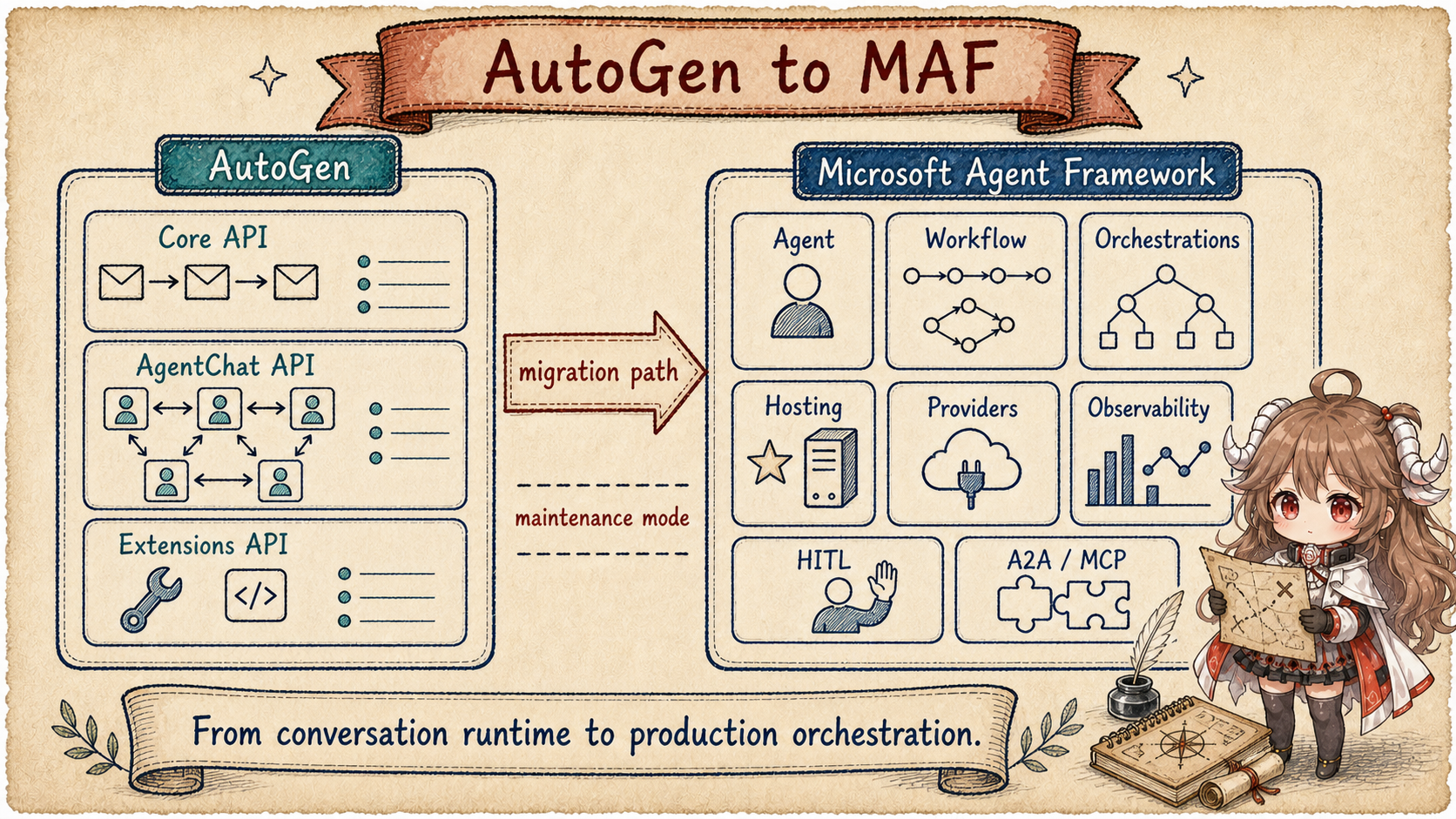
AutoGen's README sets the boundary clearly: AutoGen is now in maintenance mode. It will not receive new features, new users should start with Microsoft Agent Framework, and existing users are encouraged to migrate. The same notice calls MAF the enterprise-ready successor, with stable APIs, long-term support, multi-agent orchestration, multi-provider model support, and interoperability through A2A and MCP. Source: AutoGen README maintenance notice.
MAF's own README is not written like a simple AutoGen rename. It describes Microsoft Agent Framework as an open, multi-language framework for production-grade AI agents and multi-agent workflows in Python and .NET. It fits teams that need production operation, orchestration beyond a single Prompt or stateless Chat Loop, Graph patterns, persistent state, restart recovery, Observability, permissions and approval, Human-in-the-loop control, and Provider flexibility. Source: MAF README overview.
3. Run the same report once in each implementation
This is one logical task implemented and run twice, not a live run that starts in AutoGen and migrates midway into MAF. The AutoGen prototype exposes team messages and role rules. The MAF production version reimplements the same goal with approval, checkpoint, and publication receipt inside an explicit Workflow.
3.1 AutoGen prototype Run
- The user asks for research on three competitors. The example chooses a specific AgentChat Team pattern and calls
team.run(...). - The researcher publishes findings, and the team rule hands them to a writer.
- The writer produces a draft, the lead receives a review message, and the Team reaches its termination condition.
- If later recovery is required, the application calls
save_state, persists the result, and callsload_statebefore resuming in a new process.
3.2 MAF production Run
- A new request enters an application-owned route, which uses
WorkflowStateto resolve the explicitly selected Workflow target. - The Workflow records research, writing, review, and publishing, then emits request-info and a checkpoint before review.
- The lead responds later; the caller resumes the same Workflow through responses or checkpoint id.
- A publisher executor performs the external publication after approval and stores its receipt. Only that receipt advances approved to published.
Restart recovery has prerequisites: the application needs durable CheckpointStorage and a saved session-to-checkpoint cursor. State left only in memory
disappears with the process. The presence of a checkpoint parameter alone is not proof of cross-process recovery.
Questions this article answers.
Keep AutoGen's historical value in view: it makes the multi-agent message runtime unusually legible.
Then read MAF through its production execution and recovery: Agent.run, Workflow.run,
orchestration builders, checkpoints, HITL, and application-owned hosting routes. The important change is not the project name;
it is where runtime responsibility and recoverable state live.
Source scope.
AutoGen links are pinned to public snapshot 027ecf0a379bcc1d09956d46d12d44a3ad9cee14.
Microsoft Agent Framework links are pinned to public snapshot 723256961e8e46980b869ee2c75ef05f16644921.
Production orchestration is described from public positioning, visible classes, state writes, and recovery paths.
Use the same researcher-writer-reviewer task and the migration becomes a change in where state is stored and who triggers recovery, not just a change in class names:
AutoGen prototype
  User message
    -> SendMessageEnvelope(message, recipient, future)
    -> runtime queue
    -> MessageContext(is_rpc=True)
    -> RoutedAgent handler
    -> ResponseMessageEnvelope

  Team chat
    -> group topic / manager topic / participant topics
    -> embedded runtime publishes messages
    -> team save_state / load_state

MAF production route (a separate implementation)
  channel request
    -> application route + WorkflowState(create_workflow)
    -> app-owned checkpoint storage and session cursor
    -> Workflow.run(message=...) or Workflow.run(checkpoint_id/responses=...)
    -> status / request_info / checkpoint events
    -> channel response and durable recovery point
On the AutoGen side, the important shape is envelope, topic, and handler. On the MAF side, the important shape becomes hosted channel, session, workflow checkpoint, and HITL continuation. Keeping that difference in view prevents "multi-agent chat" and "production orchestration" from collapsing into the same idea.
4. Migration is not a class-for-class rename
AutoGen's "Why AutoGen?" section still matters because it captures the design that made the project influential. Core API implements message passing, event-driven agents, local and distributed runtime, and .NET/Python support. AgentChat is the simpler opinionated API on top of Core, familiar to v0.2 users and supporting two-agent chats and group chats. Extensions provide LLM clients, AzureOpenAI, OpenAI, code execution, and other integrations. Source: AutoGen layered design.
The same README also cautions that AutoGen Studio is for rapid prototyping and demos, not a production-ready app; deployed applications must implement authentication, security, and related features themselves. Source: AutoGen Studio caution. That keeps the comparison honest: AutoGen Studio is not the same kind of surface as MAF Hosting.
Read the AutoGen Runtime first
- Core: send / publish / topic
- AgentChat: ChatAgent / Team
- Extensions: LLM clients / tools
Read MAF production execution and recovery first
- Agent: client / tools / session
- Workflow: graph / checkpoint / HITL
- Hosting: AgentState / WorkflowState / app routes
5. How AutoGen Core delivers and routes messages
AutoGen Core is easiest to understand as an agent message center. It has to distinguish a direct request to one agent from an event sent to every subscriber of a topic. It also has to know how an agent type is created and how hosted agent state is saved and restored.
| Operation | Mental model | What the runtime owns |
|---|---|---|
send_message |
A point-to-point request, similar to RPC. | Locate the target agent, await its response, and return that response to the caller. |
publish_message |
An event sent to a topic. | Resolve subscribers through the subscription manager and deliver the event to each of them. |
| registration / state | Hand an agent to the runtime for hosting. | Create agent instances and save or restore runtime-owned agent state. |
Those responsibilities are visible in the AgentRuntime protocol:
send_message and publish_message,
agent registration,
and
runtime state.
SingleThreadedAgentRuntime is the reference implementation. It processes PublishMessageEnvelope, SendMessageEnvelope, and ResponseMessageEnvelope through one asyncio queue while tracking agent factories, instantiated agents, intervention handlers, a subscription manager, serialization registry, and tracing helper. Its docstring says it is suitable for development and standalone applications, not high-throughput or high-concurrency scenarios.
Sources:
runtime notes
and
runtime fields.
The send and publish paths are sharply different. send_message creates a future, queues a direct envelope, and waits for a response. publish_message queues a topic envelope and expects no response. Direct processing builds MessageContext(is_rpc=True) and wraps the handler output as a ResponseMessageEnvelope. Publish processing asks the subscription manager for recipients, builds MessageContext(is_rpc=False), and invokes subscribed agents concurrently.
Sources:
send / publish queueing,
direct processing,
and
publish processing.
6. RoutedAgent turns Handlers into typed routes
AutoGen Core is not just string dispatch. The @message_handler decorator reads function type hints, records target message types and return types, and checks both input and output types at runtime. @event is the publish-event variant: it requires None return values and gates on ctx.is_rpc so RPC messages do not hit event handlers.
Sources:
@message_handler contract
and
@event contract.
That is the core AutoGen flavor. An agent is not just a single LLM call. It is an actor-like object scheduled by message type, topic, and RPC/event semantics. This explains why AutoGen remains useful for understanding multi-agent conversation and research-oriented collaboration patterns, and why authentication, channels, and durable service ownership were not the Core runtime's center.
7. AgentChat wraps the Runtime into team conversations
AgentChat's ChatAgent protocol narrows the lower-level runtime into a developer-facing interface: an agent has name, description, produced_message_types, processes chat messages through on_messages or on_messages_stream, and supports reset, pause, resume, save_state, load_state, and close.
Source:
ChatAgent.
The group chat base class shows how AgentChat sits on Core. BaseGroupChat says participants share context by publishing messages. It maps AgentChat agents to the Core agent runtime and handles run, pause, resume, and reset. Each team gets unique topic types for the group, manager, participants, and output, then runs on an embedded SingleThreadedAgentRuntime.
Sources:
BaseGroupChat overview,
topics and embedded runtime,
and
runtime registration and subscriptions.
So AutoGen's higher-level experience is not a separate DSL floating above Core. It builds round-robin, selector, swarm, and Magentic-One style team patterns out of topics, subscriptions, and routed agents. The README's multi-agent orchestration sample also shows AgentTool: wrap specialist agents as tools, then give them to a general assistant.
Source:
AutoGen AgentTool example.
7.1 The application must save and restore AutoGen state
pause/resume changes the current Team's running state, while save_state/load_state exports and
imports state. The application still decides when to save, where to persist, and which record to load after restart.
MAF also retains application responsibility: Workflow supplies checkpointing, while the application chooses durable storage and a resume cursor for cross-process recovery.
8. MAF Agent combines Client, Tools, and Session
The MAF Python README starts with Agent(client=OpenAIChatClient(), instructions=...) and agent.run(...). It also shows direct chat client use through get_response without constructing an agent. That separation is important: the chat client adapts a model service; the agent adds tools, context, session, middleware, and telemetry.
Source:
Python quickstart and direct chat client.
| Layer | What it owns | Why the split matters |
|---|---|---|
| Chat client | Connect to a model provider and return a response or streaming updates. | The same agent abstraction can change providers without binding application logic to one SDK. |
| Agent | Manage instructions, tools, context providers, session, middleware, and telemetry. | A model call is one step; the run also prepares context, invokes tools, and preserves session state. |
as_tool |
Wrap one agent as a tool another agent can call. | Multi-agent work can reuse ordinary tool semantics instead of always opening a group chat. |
In source, the SupportsChatGetResponse protocol only requires get_response. It supports streaming and non-streaming calls with messages, options, compaction strategy, tokenizer, function invocation kwargs, and client kwargs. Agent.run prepares a run context, calls the downstream client's get_response, then parses ChatResponse or streaming updates into AgentResponse.
Sources:
SupportsChatGetResponse,
Agent.run and client call,
and
response parsing.
BaseAgent owns id, name, description, context providers, middleware, session creation, and service session retrieval. RawAgent takes the client, instructions, tools, default options, context providers, middleware, compaction strategy, and tokenizer. It normalizes tools, separates MCP tools, and merges agent-level defaults into chat options.
Sources:
BaseAgent session and context
and
RawAgent setup.
MAF also makes agent delegation a first-class tool path. BaseAgent.as_tool wraps an agent as a FunctionTool, with approval mode, streaming callback, and optional parent-session propagation. Multi-agent collaboration does not have to start as group chat; it can also use ordinary tool invocation semantics.
Source:
BaseAgent.as_tool.
Parent-session propagation has a narrower boundary too: as_tool creates a child session that shares the parent's state by reference but clears its own service_session_id.
Concurrent delegations therefore cannot overwrite each other's provider continuation ID. Shared state still requires application discipline; this is not a fully isolated state copy.
See delegated session construction.
9. MAF Workflow is a Graph engine, not a chat Transcript
Workflow has a heavy docstring for a reason. It is a graph-based execution engine that connects executors with edge groups and uses a Pregel-like superstep model until the graph becomes idle. Executors run when they receive messages, send downstream messages with ctx.send_message(), yield workflow-level outputs with ctx.yield_output(), and add custom events with ctx.add_event().
Source:
Workflow overview.
Its run API looks like a recoverable job interface rather than a normal chat loop. run supports an initial message, streaming, responses, checkpoint_id, checkpoint_storage, status event inclusion, and kwargs passed to subagent tools or clients. Validation forbids message together with responses or checkpoint_id, and requires at least one of message, responses, or checkpoint_id.
Sources:
Workflow.run
and
run parameter rules.
Workflow state is user-visible. The run stream emits started, status, request_info, and failed control events. If an executor requests outside input, the workflow can enter IDLE_WITH_PENDING_REQUESTS; the caller can later continue with run(responses=...), or restore from a checkpoint and provide responses. Checkpointing captures executor states, in-transit messages, and shared state for restart.
Sources:
request info and checkpointing,
workflow status events,
and
core run continuation.
A durable approval pause requires more than a “latest checkpoint ID.” With storage configured, resolve_pause_checkpoint_id loads candidate checkpoints and checks that they contain the current pending request IDs, excluding points from before this run or its initial restore. It returns None if no safe candidate exists. Without readable storage it can only return an ID newly produced by this run, without verifying request coverage; an ID alone is not a durable-resume guarantee.
run(responses=...) also saves an entry checkpoint after queuing responses and before the superstep consumes them, covering the gap between accepting a review answer and recording its subsequent execution.
See pause checkpoint verification and response-entry checkpointing.
10. Orchestrations are prebuilt Graphs, not a second Runtime
The MAF README lists sequential, concurrent, handoff, and group collaboration as graph-based workflow patterns, with checkpointing, streaming, human-in-the-loop, and time-travel. The Python README lists advanced orchestration patterns as Sequential, Concurrent, Group Chat, Handoff, and Magentic. Sources: MAF key features and Python orchestration overview.
In source, SequentialBuilder resolves participants into executors. Agent-like participants become AgentExecutor; with request info enabled, they become AgentApprovalExecutor. It then uses WorkflowBuilder to add edges from input conversation through each participant. Sequential orchestration is therefore a workflow graph template.
Sources:
SequentialBuilder setup,
participant resolution,
and
workflow build.
Human-in-the-loop also lands on workflow mechanics. AgentRequestInfoExecutor receives an agent response and calls ctx.request_info(...). If the user provides extra messages, execution returns to the agent executor; if not, it approves the original response. AgentApprovalExecutor wraps an internal workflow containing the agent executor and request-info executor loop.
Sources:
AgentRequestInfoExecutor
and
AgentApprovalExecutor.
For the report, that decision approves a draft; it does not publish it. A separate publisher executor consumes an
approved draft. Requested changes return to the writer, rejection terminates publication, and approval permits the
external publication call. Only a returned publication_id advances the Workflow to published. The draft
being produced, the lead validating it, and the publication system
adopting it are distinct states.
Group chat likewise does not return to AutoGen's topic runtime. It is expressed as orchestrator plus workflow graph. GroupChatOrchestrator uses a selection function to choose the next participant, broadcasts context, receives responses, saves conversation, checks termination or round limits, then continues. AgentBasedGroupChatOrchestrator asks an agent to produce the structured selection decision.
Sources:
group chat module overview,
selection-function orchestrator,
and
group chat loop.
11. Hosting supplies state helpers; the application owns routes
Production still needs HTTP, WebSocket, or messaging entry points, but the current hosting package has a narrower responsibility.
AgentState pairs an Agent with a SessionStore; WorkflowState resolves a Workflow, factory, or builder.
The application's chosen web framework owns routes, authentication, middleware, responses, and background work.
The former AgentFrameworkHost and ChannelContext are absent from current exports.
See the hosting state contract and public exports.
For an Agent entry point, the application reads an independent working copy with get_or_create_session and explicitly writes the completed session with set_session.
Response-ID keys let two branches start from one old snapshot. A fixed conversation ID instead advances a mutable head, requiring application locking or optimistic concurrency control.
The creation lock inside AgentState does not cover the entire Agent run.
See session reads and writes.
# Shape-level: state, previous_id, response_id are application inputs
session = await state.get_or_create_session(previous_id)
agent = await state.get_target()
result = await agent.run("Continue refining the report", session=session)
await state.set_session(response_id, session)
The report's Workflow route uses CheckpointStorage directly; the application retains a session_id -> checkpoint_id cursor.
WorkflowState does not own checkpoint storage. A Workflow instance permits only one active run, so concurrent services should supply a factory or builder with cache_target=False to resolve a fresh instance per request.
See the Workflow hosting example and concurrency contract.
In-memory storage is not durable storage; external publishing still needs idempotency keys and business receipts.
Migrating from AutoGen to MAF therefore means assigning responsibilities again: how message and Team state become Agent sessions, Workflow checkpoints, and HITL continuation, and which records the application stores. MAF supplies these mechanisms. Restart safety, concurrent serving, and adoption of final output must be verified with the application's storage setup.
12. Compare it with the earlier chapters
| Framework | Owner To Read First | Best Question |
|---|---|---|
| AgentScope | Agent turn ledger and OpenAI API adapters. | How do message, tool, event, and context unify inside one turn? |
| ADK Python | Code-first Agent + Workflow + Runner. | How do autonomous agents and deterministic graphs share a service boundary? |
| Agno | AgentOS platform control plane. | Who owns APIs, storage, approval, RBAC, and interfaces? |
| AutoGen | Core message runtime and AgentChat team. | How do multi-agent conversations, topics, subscriptions, and group chats work? |
| Microsoft Agent Framework | Agent, Workflow, Orchestrations, Hosting. | How should new projects move agent systems toward production orchestration? |
The next chapter moves to CrewAI. Its keywords are not runtime bus first, but role, task, crew, process, flow, knowledge, and memory: it models team collaboration directly as an agent application.