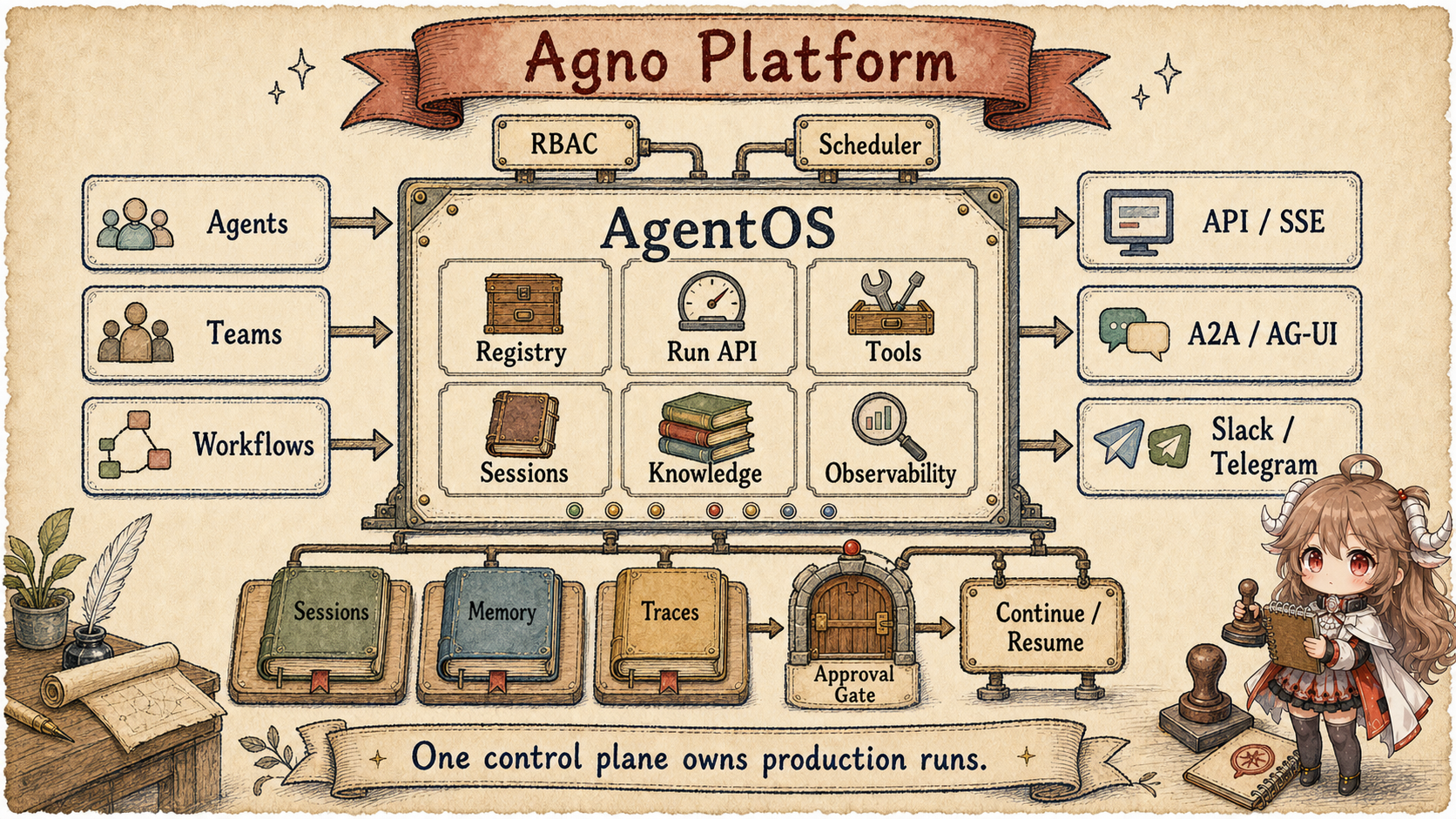
1. Why a local sales assistant is not yet a platform
Start with an internal sales-assistant platform. Salespeople use it from the web, Slack, and Telegram; administrators need traces and metrics; tools that update the CRM require approval; each team must see only its own sessions; and scheduled jobs must keep running in the background. At that point, the main design question is no longer how to write an Agent Loop. It is which component handles each product-runtime responsibility.
Merely wrapping the local Agent in HTTP leaves the hard parts disconnected. Web and Slack create separate histories, a timed-out CRM write has uncertain status, and the original process is gone when an administrator approves an action. The object still answers, but users, runs, approvals, and recovery do not belong to one system.
2. Five objects that make an Agent platform
An agent platform lets a set of Agents serve multiple entry points over time while managing identity, state, risky actions, and run evidence consistently. In Agno, start with five objects:
- Agent: the model, tools, knowledge, and behavior needed for one kind of work.
- Run: one execution of a request; it may stream, run in background, pause, or continue.
- Session: connects one user's messages, runs, and state for persistence and recovery.
- AgentOS: assembles Agents, Teams, Workflows, databases, and interfaces into one service app.
- Approval and identity rules: decide who can see what and when a risky tool action may continue.
3. How one sales request reaches completion
The walkthrough deliberately chooses a CRM-writing branch that requires approval. A read-only run can finish when the Agent returns its answer. Memory and tracing are read or side-recording capabilities, not mandatory sequential stops in every Run. Their presence on one platform map means AgentOS can connect these components; it does not mean “Session → Memory → Tracing → Approval” is a fixed pipeline.
- A salesperson sends a request from web or Slack; the entry point authenticates the user and finds the session.
- AgentOS routes to the sales Agent and attaches database, tools, and event storage.
- The Agent starts a run, looks up the account, and streams text and tool events to the client.
- When the model proposes a CRM update, an approval gate stores the pending action and pauses the run.
- After approval, the platform continues the persisted run instead of asking the model to start over.
- The result, events, usage, and session state remain available for operators and the next user turn.
Platform does not mean a longer feature list. It means every step from entry to recovery has a responsible component and a persistent record. API, RBAC, Scheduler, and Interfaces later extend this same route with more entry points, permissions, and operations.
Agno's README does not open with a smarter agent class. It opens with Build, run, and manage agent platforms. It calls Agno an SDK for building agent platforms, then says you can build agents using any framework, run them as production services with tracing, scheduling, and RBAC, and manage them from one control plane. Source: README introduction.
The feature list reads like a product runtime inventory: Production API, Storage, integrations, Context Providers, Human approval, Observability, Security, Interfaces, Scheduling, and Deploy anywhere. See README features. So the first useful question is not only how the agent loop works. It is where these product responsibilities land.
Questions this article answers.
Read Agno as an Agent platform, not as a larger Agent class. Agent contains the Model,
Tools, and Context needed by one Run. AgentOS brings Agents, Teams, Workflows, Database, APIs,
Approvals, RBAC, Scheduler, Interfaces, and Observability into one service application.
Source scope.
Source links are pinned to Agno public snapshot 85b6d1d178b70d59e8f2c0d432d2a66b35004f31.
This chapter uses the public README and source code. Platform behavior is described from visible classes, routes, Sessions, Approval logic, and Auth structure.
One sales-assistant run shows the platform chain. This is not Agno's full request schema; it is the state flow to keep in view while reading the source:
POST /agents/sales-assistant/runs
  request: {user_id, session_id?, message, stream, background}

AgentOS bootstrap
  -> inject database / checkpoint / MCP tools
  -> enable store_events for built-in routes

Agent run emits tool call: update_crm(...)
@approval(required) -> pause run
approval record:
  {run_id, session_id, status: "pending", tool_name, user_id, context}

AgentSession.upsert_run(paused_run)
admin resolves approval
POST /agents/sales-assistant/runs/{run_id}/continue
  -> require_approval_resolved
  -> resume from persisted run state
  -> stream missed and live events back to client
That is the difference between an agent object and a platform runtime. The object can answer. The platform has to own HTTP entry, user isolation, event buffering, approval records, persisted runs, and the continuation path after approval is resolved.
4. The Agent object already exposes platform interfaces
Agno's Agent is not a thin model-plus-tools wrapper. Its fields make more sense when grouped by
the product questions they answer: who is running, what the run may use, how it survives, and how operators
can inspect it.
| Product question | Agno capabilities | Why a prompt is not enough |
|---|---|---|
| Who is using it? | user, session, session_state, dependencies | A multi-user product must separate users, teams, and run context. |
| What may it access? | knowledge, memory manager, history, skills, tools | Data, history, and tools need reuse, audit, and entry-point controls. |
| How does it survive? | database, checkpoint, media storage, structured outputs | Long sessions, background work, and recovery need persistence boundaries. |
| How is it observed? | events, telemetry, hooks, followups, reasoning | Production runs need traces, metrics, and replayable records. |
The corresponding fields are concentrated in the
base Agent configuration,
tools, context, output, and event fields,
and
initialization.
That shape targets agents that run many times, through many entry points, with storage and audit requirements. checkpoint decides when run state is persisted. store_events decides whether run responses keep events. store_history_messages documents a storage tradeoff: storing only each run's own messages is linear; storing all history inside every run can grow quadratically.
Agent configuration and current Run
- Model, tools, reasoning
- Projected history, knowledge, memory lookup
- Output schema and run events
AgentOS service entry
- Agents, teams, workflows
- Dependency injection, routes, interfaces
- Registry, scheduler, tracing
Persistent records and external facts
AgentSession: runs and history- Approval table: decision and audit
- External CRM: actual customer change
These are not three peer classes. Agent is the runnable object, AgentOS assembles and exposes runnable objects, while
AgentSession, the approval table, and CRM retain execution facts, governance decisions, and business
facts respectively. An Agent field named session_state cannot replace those durable owners.
5. AgentOS assembles the service application
AgentOS accepts agents, teams, workflows, knowledge, interfaces, database, authorization, MCP server, registry, scheduler, and tracing. It also rejects an empty OS when no agents, workflows, teams, knowledge, or database are provided.
Source:
AgentOS.__init__.
Initialization is not just name registration. _initialize_agents injects the OS-level database into agents without their own database, injects the OS-level checkpoint setting, collects MCP tools, calls initialize_agent, and turns on store_events so built-in routes can work. Teams and workflows receive the same platform treatment: database, MCP collection, event storage, and background hook propagation.
Source:
initializing agents, teams, and workflows.
get_app turns those objects into a FastAPI application. It composes user lifespan, MCP tools lifespan, database lifespan, scheduler lifespan, and HTTP client cleanup. Then it mounts routes for sessions, memory, learnings, evals, metrics, knowledge, traces, database, components, schedules, approvals, registry, agents, teams, workflows, and websockets.
Sources:
built-in routes
and
get_app.
6. API routes create, pause, and continue a Run
POST /agents/{agent_id}/runs supports text, media, sessions, factory input, SSE, and background execution.
Background work requires an Agent database. With QueueConfig(durable=True), serializable requests without media or a pinned version, targeting a registered ordinary Agent, can enter a durable queue.
A committed queue row means accepted work; a Worker that claims it performs execution. Streaming clients tail events, while non-streaming clients receive 202 and run identifiers.
Ineligible requests can still use process-local background execution. A detached task survives a client disconnect, not automatically a process crash.
See background dispatch and queue configuration.
background request -> check database and queue eligibility
  eligible -> durable acceptance -> Worker claim -> final run record
  ineligible -> process-local background execution
202 / queued does not mean completed; read final status and output from the run
The queue accepts Idempotency-Key: duplicate submissions reuse the original run, and a full queue returns 429.
A streaming submission that reuses a non-streaming job's key receives a conflict and must poll the original run.
Submission deduplication does not guarantee exactly-once CRM writes. Verify the final run separately from its best-effort live event stream.
The continue route is the stronger clue. It does not merely call the model again. It dispatches by persisted run state and request body: paused runs can continue with HITL tool results, or with empty tools after an admin approval is resolved; running and error runs can resume from the last persisted state; completed runs can continue with appended messages. It also supports continue_from, fork, regenerate, replace_original, and resumable background SSE.
Source:
continue_agent_run.
The resume endpoint makes event streaming a platform protocol. A client reconnects with last_event_index; the runtime sends missed events and keeps streaming live events if the run is still active. Completed runs can replay from the in-memory buffer or from the database.
Source:
resume_agent_run_stream.
6.1 continue and resume repair different interruptions
| Current record | Call | What changes |
|---|---|---|
| New or foreground run | POST /runs |
Create a run, execute the Agent, produce new events |
| Paused with tool results or resolved approval | /continue |
Reload durable run state and advance execution |
| Running/error with a supported durable recovery point | /continue |
Resume computation through the route's accepted body shape |
| Background run is active but SSE disconnected | /resume?last_event_index=… |
Replay events and reconnect the stream without rerunning the Agent |
| Completed run receives a new message | /continue + message |
Create later work with the prior run ledger as context |
Continuation first establishes whose run it is: the route verifies both session ownership and the run's Agent identity. If the original run pinned a component version, it rechecks draft-preview access and loads that version; factory and remote Agents use their own resolution paths. Publishing a version while approval is pending should not silently change the tool implementation of a pinned run. See ownership and version-stable continuation.
7. Session stores the records needed to recover a Run
AgentSession is not a flat message array. It stores session_id, agent_id, team_id, workflow_id, user_id, session_data, metadata, agent_data, runs, summary, created_at, and updated_at.
Source:
AgentSession.
upsert_run updates or appends by run_id. get_messages reconstructs the model-visible history from runs, filtering paused, cancelled, error, and regenerated runs by default. It also skips messages already marked as history, removes leading orphan tool messages, and filters member runs. The stored object is a run ledger; current context is a projection of that ledger.
Source:
run upsert and message projection.
get_run returns a deep copy so a continue request cannot expose changed tool answers to other readers before persistence.
upsert_run preserves an existing queue_attempt, preventing a whole-run save by the executor from erasing the Worker's attempt generation.
These session read/write rules keep a shared in-memory object distinct from committed state.
8. Human Approval pauses Tools with side effects
Agno's @approval decorator is not a UI note. When applied to a Function, it sets approval_type. For required approvals, it turns on requires_confirmation if no other HITL flag is already set. For audit, it requires one of confirmation, user input, or external execution.
Sources:
@approval
and
approval type.
When a run pauses, Agno creates an approval record with run_id, session_id, status, approval_type, pause_type, tool name, source type, agent/team/workflow IDs, user_id, schedule IDs, requirements, and context. It stamps the approval_id back onto affected tools before storing the paused run. Sources: sync approval creation, async creation and stamping, and agent pause handling.
The approval API owns list, count, status, get, resolve, and delete. Resolve writes status, resolved_by, resolved_at, and resolution_data. Under user isolation, read and write visibility is scoped to the caller. The agent continue route also includes require_approval_resolved(os.db), so unresolved admin approval blocks normal continuation.
Sources:
approval router policy,
approval endpoints,
and
continue route dependency.
| Lifecycle step | Durable change | Boundary to remember |
|---|---|---|
| A tool requests approval | The run pauses, a pending approval is stored, its ID is stamped onto the tool, and the paused run is written to AgentSession. |
The approval record and session own recovery; the UI does not. |
| An administrator resolves it | Status, resolver, time, and resolution data are persisted. | Resolving the approval records a decision. It does not execute the tool. |
| The client continues the run | The route checks require_approval_resolved, reloads run state, then resumes and streams missed and live events. |
The continuation call is separate from the approval decision. |
| The request is denied or out of scope | The stored decision and caller scope still govern the next transition. | An admin click does not bypass user isolation or RBAC. |
Complete the main example: administrator approval changes only the approval record to resolved. The client then calls
/continue, and only then does the runtime execute update_crm. A CRM receipt becomes a tool
result, the completed run is upserted into AgentSession, and the user receives the outcome. Rejection
skips the tool and becomes part of the final answer. The runtime producing a pending action, the
approval authority validating it, and CRM plus the business process adopting the
change are distinct transitions.
If two sales-Team members pause, one approval must not authorize another member's tool.
The runtime first uses each tool's approval_id, then its owning member_run_id; only tools without scoped identity may fall back to run-level lookup.
A tool-call ID matching several members has ambiguous ownership. Missing or pending records block continuation. After database reload, distinct copies in the tools list and requirements must both receive the decision.
See per-tool approval matching and applying decisions.
9. RBAC and Interfaces protect product entry points
AgentOS scopes are not just admin versus user. The scope format supports resource/action and resource/resource-id/action, such as agents:read, agents:web-agent:run, agents:*:run, and agent_os:admin.
Source:
scopes.py.
HTTP auth supports a security key, JWT middleware, and service-account tokens dispatched by the agno_pat_ prefix. The scheduler's internal service token receives scopes for agents, teams, workflows, and schedules. User isolation is a route-layer contract: when a regular JWT user is scoped, get_scoped_user_id returns the JWT subject, and endpoints must thread that user_id into database reads and writes.
Sources:
authentication dependency,
user isolation contract,
and
scoped user resolution.
Interfaces expose the same control plane through product-specific routes. BaseInterface requires get_router to return a FastAPI router. AgentOS mounts provided interfaces, and can add an A2A interface automatically when requested.
Sources:
BaseInterface
and
interface mounting.
The visible interface package includes A2A, AG-UI, Slack, Telegram, and WhatsApp entry points.
10. Compare Agno with the earlier chapters
| Framework | Owner To Read First | Common Misread |
|---|---|---|
| AgentScope | Evented agent turn: message, tool call, event, context ledger. | Only a Chat Completions wrapper. |
| ADK Python | Code-first app runtime: Agent, Workflow, Runner, Event, Task API. | Only a workflow DSL, or only an agent class. |
| Agno | Agent platform control plane: AgentOS, API, storage, approval, RBAC, interfaces. | Only a larger agent dataclass. |
The next chapter moves to AutoGen and Microsoft Agent Framework. The focus shifts to multi-agent conversation, topic and event runtimes, hosted orchestration, and migration boundaries between old and new framework surfaces.