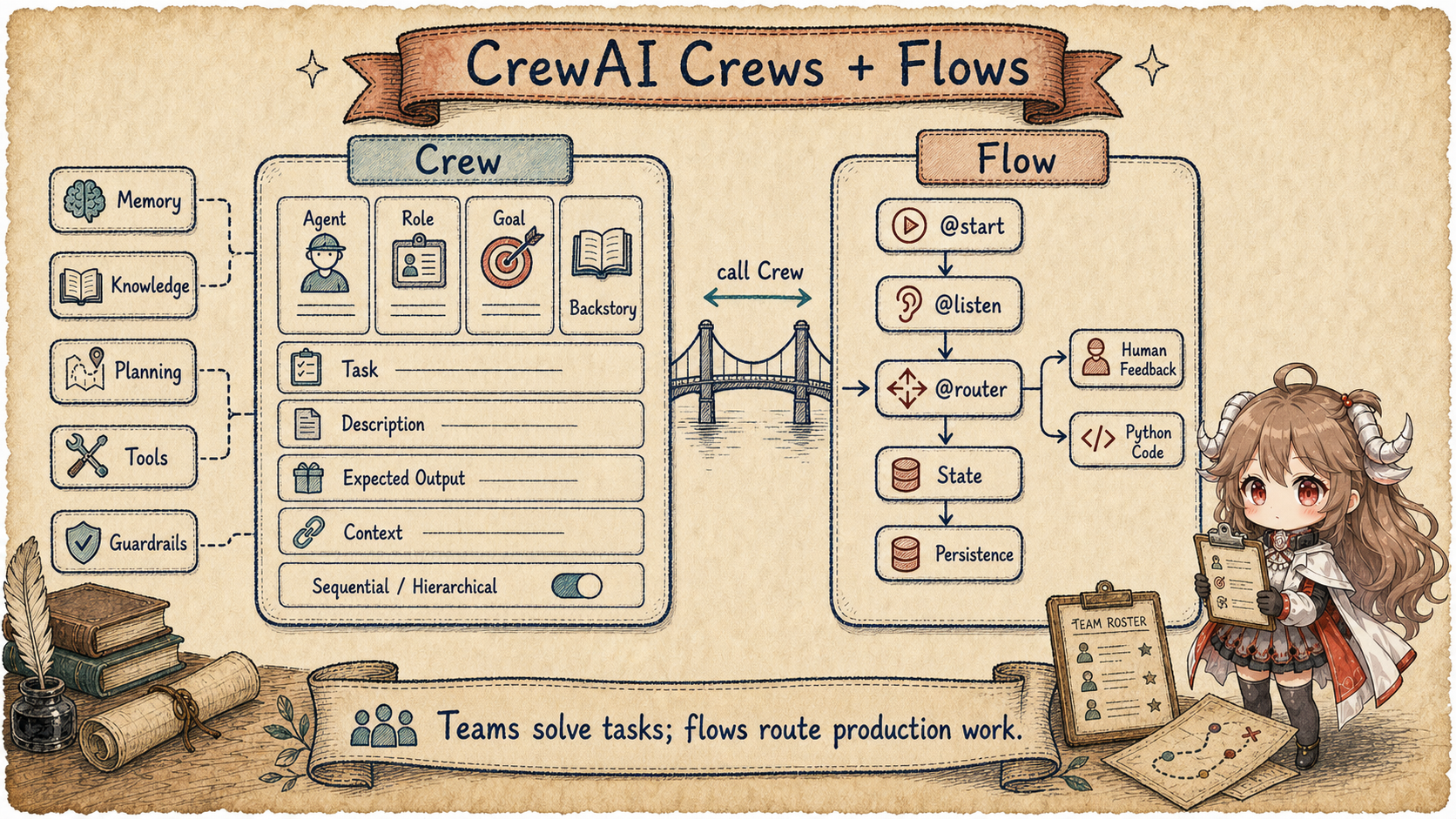
1. Build the smallest AI research team
Suppose you need to compare three products. One model can write an answer, but searching, checking evidence, and organizing a long report compete for its attention. A more natural design separates the work: a researcher gathers evidence and a writer turns that evidence into a report. CrewAI expresses this small team with three objects:
- Agent is the worker, with a role, goal, background, and tools such as web search.
- Task is the task card: what to do, what a good result looks like, and which upstream material is required.
- Crew is the team: it collects workers and task cards, then chooses sequential handoff or manager-led assignment.
Nothing here requires advanced framework vocabulary. One large prompt has simply become two workers, two task cards, and a team that coordinates them. That is the first mental model to keep when reading CrewAI.
2. Why a collaborating team still needs a Flow
A Crew can finish the report without making it a reliable production process. Insufficient evidence may need to return to research, sensitive conclusions may require human approval, and a two-hour approval delay must resume from the same place. These are no longer questions about worker expertise. They are questions about the next step, pause points, and stored state.
A Flow is the explicit route through that process: entry point, connected steps, conditional branches, and recovery points. A Crew lets agents collaborate with autonomy; a Flow places their work inside a predictable business process. They own two layers of the same application rather than competing with each other.
3. Follow one competitive report through Crews and Flows
- The user submits product names, and the Flow records the topic and run identifier in its state.
- The Flow starts a research Crew, and the researcher Agent receives a Task to find reliable evidence.
- The researcher returns sourced findings, which become upstream context for the writing Task.
- The writer Agent creates a structured report, and the Crew collects the task outputs before ending its run.
- The Flow method that called the Crew explicitly extracts
CrewOutputand writes the report into Flow state; this handoff is not automatic. - The Flow inspects the report in its own state: missing evidence routes back to research; a complete report proceeds to review.
- If human approval is required, the Flow persists state and pauses, then continues after the reviewer responds.
- Publication completes and the Flow records the result; the Crew does not need to know whether Web, cron, or another channel started it.
CrewAI's README positions the project directly. It is a Python multi-agent automation framework built from scratch and independent of LangChain or other agent frameworks. The same block splits the product into CrewAI Crews and CrewAI Flows. Crews optimize for autonomy and collaborative intelligence. Flows are the enterprise and production architecture for building and deploying multi-agent systems, with granular event-driven control, single LLM calls, task orchestration, and native Crew support. Source: CrewAI README overview.
The README later restates the boundary. Crews are teams of AI agents with autonomy and agency, solving complex tasks through role-based collaboration. Flows are production-ready event-driven workflows with execution path control, state management, Python code integration, and conditional branching. The combined promise is to balance autonomy with precise control. Source: Understanding Flows and Crews.
Questions this article answers.
This chapter answers three questions: why CrewAI models an agent as a role-bearing worker; how
Task, Crew, and Process turn several workers into executable work; and why
production paths still need Flow. The goal is to know when a Crew is enough and when explicit
Flow control is necessary.
Source scope.
CrewAI links are pinned to public snapshot 0374c631297f219a3891945cfc81f82ea54dd776.
This article uses only public README, Docs, and source. “Team collaboration workflow” summarizes how Agent, Task, Crew, and Flow divide work; it is not an official CrewAI term.
4. See how Crews and Flows divide work in the source
A competitive-research report makes the Crews / Flows split concrete. There are two separate questions. Who works on it: researcher, writer, reviewer. How the process is controlled: whether research is enough, whether the draft loops back, and whether a human approves before publishing.
Crews side
  researcher = Agent(role, goal, backstory, tools)
  writer = Agent(role, goal, backstory)
  research_task = Task(description, expected_output, agent=researcher)
  write_task = Task(description, expected_output, agent=writer, context=[research_task])
  Crew(agents=[researcher, writer], tasks=[research_task, write_task], process=sequential)
    -> kickoff(inputs)
    -> TaskOutput(raw/json/pydantic, output_file?)
    -> CrewOutput(tasks_output, token_usage)

Flows side
  state = {topic, research_result, draft, review_status}
  @start collect_research
  @listen collect_research -> write_report
  @router review_report -> "publish" or "human_review"
  persistence stores state id and resumes from the next event
In that shape, Crew turns "who does which task" into executable collaboration. Flow turns "which step happens next, where state is stored, and where execution resumes after failure or feedback" into explicit control.
4.1 The Crew-to-Flow handoff must be written explicitly
Task.context=[research_task] passes an upstream TaskOutput to a downstream Task inside one
Crew. It does not write into Flow state. Flow state likewise does not absorb CrewOutput automatically.
The report task needs an explicit bridge:
@start()
def collect_research(self):
    crew_output = research_crew.kickoff(inputs={"topic": self.state.topic})
    report = crew_output.pydantic or crew_output.json_dict or crew_output.raw
    self.state.research_result = report
    return "research_ready"
This simplified example shows the explicit handoff. Crew produces CrewOutput; the Flow method selects
a consumable shape and updates research_result; the router then reads Flow state. One report package can
now evolve continuously: topic → ResearchPacket → DraftReport → ReviewDecision → PublicationRecord.
The Crew docs say a crew represents a collaborative group of agents working together toward a set of tasks. It defines strategy for task execution, agent collaboration, and the overall workflow. The attribute table is not a transport table. It lists tasks, agents, process, manager_llm, function_calling_llm, memory, cache, embedder, callbacks, planning, knowledge_sources, and stream. CrewAI first asks the application to state who works, what they work on, how the run proceeds, how memory and knowledge are added, and how output is collected. Source: Crew docs attributes.
The Flow docs describe a Workflow engine. Flows coordinate coding tasks and Crews, create structured event-driven workflows, connect Tasks, manage State, control execution, and support conditional logic, Loops, and branching. Flow therefore controls the production route; it is not a renamed Crew. Source: Flow docs overview.
Crews organize autonomous collaboration
- Agent: role / goal / backstory
- Task: description / expected output
- Process: sequential / hierarchical
Flows control the production route
- Decorators: @start / @listen / @router
- State: dict or Pydantic model
- Control: persistence / HITL / routing
5. Agent is a role-bearing Worker, not just an LLM wrapper
Start with one competitive-research worker. A completion adapter would only need a prompt. A CrewAI agent has to work repeatedly inside a team, so it must answer who it is, what it can do, what limits it obeys, which work context it belongs to, and how model calls are shaped.
| Question | Representative fields | Beginner mental model |
|---|---|---|
| Who am I? | role, goal, backstory |
Give the model an identity, a reason for working, and a delivery target. |
| What can I do? | tools, apps, mcps, skills |
Let the worker search, call external systems, and use platform capabilities. |
| What limits apply? | max_iter, max_rpm, cache, guardrail |
Bound loops, request rate, cost, and output risk. |
| Where am I working? | crew, memory, knowledge, execution_context, callbacks |
Attach team context, prior experience, reference material, and observable events. |
| How is the model called? | llm, function_calling_llm, templates, use_system_prompt |
Choose models for normal and tool-calling turns, and control prompt assembly. |
Read this way, the many BaseAgent and Agent fields are five groups of runtime
responsibility rather than one configuration dump. The definitions are in
BaseAgent fields
and
Agent fields.
Executing a Task takes more than one Model call
When that researcher receives a task card, Agent.execute_task does not simply send its description
to an LLM. It assembles the task prompt and output schema, adds upstream context, recalls memory, queries
knowledge, prepares tools and training data, and only then invokes the executor. In other words, an agent
turn is task card + memory + knowledge + tools + output constraints.
Sources:
task prompt preparation,
memory retrieval,
execute_task,
and
executor invocation.
Why Agent.message() creates a temporary Crew
Even Agent.message() reinforces the model. It does not bypass task and crew semantics for one direct model call. It creates a temporary Task and single-agent Crew, runs crew.kickoff(), and returns the raw output.
Source:
Agent.message.
6. Task defines the work and the required output
If Agent is the worker, Task is the task card. It says more than "analyze the
competitors": it names the expected result, assignee and context, machine-readable output shape, and
acceptance path.
| Part of the task card | Representative fields | Problem it prevents |
|---|---|---|
| Work request | description, expected_output |
A prompt that names an action but never defines success. |
| Assignee and context | agent, context, tools, input_files |
Each worker having to guess upstream results and available capabilities. |
| Output shape | output_json, output_pydantic, response_model, output_file |
Downstream systems receiving only unstructured prose. |
| Acceptance | guardrail, guardrails, guardrail_max_retries, human_input |
A bad result advancing automatically or retrying forever. |
That is why the field list is long: the same object owns work description, context, output format, and
acceptance logic. See
Task fields.
Execution keeps that contract visible. execute_sync and execute_async both reach _execute_core. The core method validates an agent, stores prompt context, emits TaskStartedEvent, calls the agent, converts results into TaskOutput according to BaseModel, output_pydantic, output_json, and guardrail settings, runs callbacks, optionally writes output_file, then emits TaskCompletedEvent.
Sources:
sync and threaded async entry
and
_execute_core.
Task.prompt() is the textual version of the work contract: description plus expected output. It can append Markdown instructions, trigger payload, and input file context. That is a different abstraction from replaying a flat chat-history array.
Source:
Task.prompt.
A finished report does not prove every research tool succeeded. Task collects structured tool_failures, and guardrail retries merge earlier failures into the final output.
tool_failure_policy defaults to warn, which records and emits the failure but continues; raise records it and aborts; ignore does neither.
Precedence is tool, Task, Agent, then Crew. Publication should check both report quality and tool failures rather than only a nonempty CrewOutput.raw.
See policy resolution and failure accumulation across retries.
research tool reports ToolFailure
  warn  -> TaskOutput.tool_failures + report may still be produced
  raise -> ToolExecutionFailedError
  ignore -> no failure record or event
7. Crew executes the Tasks; Process selects the route
Putting agents and tasks in two lists does not create an execution plan. Crew.kickoff is the owner
that restores checkpoints, prepares inputs and event scope, chooses a process, runs the tasks, and collects
callbacks and usage metrics. In this snapshot, the executable main paths are sequential and
hierarchical; consensual is not implemented as a runnable path.
Sources:
Process
and
Crew.kickoff.
| Process | Mental model | Suitable work |
|---|---|---|
sequential |
Pipeline handoff | The researcher produces evidence, the writer drafts, and the reviewer checks the result. |
hierarchical |
Manager delegation | Many roles and tasks where a manager decides who should handle the next piece of work. |
Sequential process executes the task list directly. Hierarchical process first creates a manager agent and then executes the same task list. A custom manager agent is set to allow delegation. Without one, CrewAI creates a default manager with delegation tools and the configured manager LLM. Source: sequential and hierarchical process.
_execute_tasks is the scheduler inside Crew. It prepares execution data for each task, handles conditional tasks, starts futures for async tasks, drains pending futures before sync tasks, aggregates upstream context, and calls task.execute_sync. _create_crew_output then uses the last valid raw task output as the crew raw output while retaining all task outputs and token usage.
Sources:
_execute_tasks
and
context and final output.
Planning also stays inside the task model. _handle_crew_planning asks CrewPlanner for a per-task plan and appends the matching plan to each task description. CrewPlanner creates a planning agent and a planning task whose output is PlannerTaskPydanticOutput.
Sources:
_handle_crew_planning
and
CrewPlanner.
8. Memory, Knowledge, and Tools fill three different gaps
These three names are easy to blur together. In CrewAI, memory answers "what relevant experience do I already have?"; knowledge answers "what reference material may I search?"; tools answer "what can I do outside the model?" They can all affect one turn, but they enter it through different runtime surfaces.
| Capability | Problem it solves | Where it enters execution |
|---|---|---|
| Memory | Recover relevant information from prior experience. | Use the task description as a query, format recalled memories, and append them to the prompt. |
| Knowledge | Search agent-level or crew-level reference material. | Query both knowledge scopes and add the result to execution context. |
| Tools | Call external capabilities or expose delegation to a manager. | The Crew prepares them from process, agent settings, apps, MCP, memory, and input files. |
The implementation follows that split. During task execution, memory recall uses the task description as
the query and appends relevant memories to the prompt. Knowledge retrieval checks agent and crew scopes;
crew-level query_knowledge delegates to the crew knowledge base.
Sources:
agent memory retrieval,
agent and crew knowledge lookup,
and
Crew.query_knowledge.
Tool injection is process-aware. _prepare_tools adds tools based on allow_delegation, hierarchical manager use, code execution, multimodal support, apps, MCP, memory, and input files. In hierarchical mode, the manager gets delegation tools to coordinate task agents. Outside hierarchical mode, an agent with delegation enabled can receive other agents as delegation tools.
Sources:
_prepare_tools
and
delegation and platform tools.
9. Flow draws an explicit production route
In the current source, crewai.flow.flow is a compatibility re-export surface. The file comments say implementation lives in crewai.flow.dsl, crewai.flow.flow_definition, and crewai.flow.runtime. The public Flow class inherits the runtime Flow and composes the supported conversational mixin from crewai.flow.conversational_mixin.
Source:
flow.py re-export.
Three control decorators: entry, listener, and router
The DSL decorators stamp metadata. @start marks an entry point and can carry a condition. @listen binds a method to a route label, method reference, or or_ / and_ condition. @router marks a routing method; its return value becomes a downstream event, and explicit emit values or Literal / Enum return annotations enter the static definition.
Sources:
@start,
@listen,
and
@router.
In runtime, Flow is a Pydantic model with initial_state, name, tracing, stream, memory, input_provider, and related fields. flow_definition() lazily builds the static FlowDefinition from the class. State can be a dict or BaseModel, and _initialize_state updates inputs while ensuring dict state has an id.
Sources:
Flow class and definition
and
state initialization.
kickoff is a synchronous wrapper around kickoff_async. The async path handles checkpoints, streaming, input files, restore_from_state_id, persistence hydration, FlowStartedEvent, start methods, and resumption. With unconditional starts, only those run at kickoff. Without unconditional starts, all starts can act as entry points, often in parallel. _execute_start_method executes the start method and, if it is a router, treats the return value as an additional trigger.
Sources:
Flow.kickoff,
kickoff_async setup,
and
start method execution.
Listener dispatch is also precise. Routers run first and sequentially; each router result becomes a new trigger. Plain listeners then run in parallel. The runtime tracks OR-listener firing state so multi-event OR conditions do not repeat unexpectedly. Method execution emits started, finished, failed, or paused events, can run synchronous methods in a thread pool, and persists method completion afterward.
Sources:
_execute_method,
method persistence,
and
router and listener dispatch.
@persist and @human_feedback follow the same model. They stamp configuration on a class or method, and the Flow engine reads the definition during method completion or human feedback handling. Production features stay attached to the graph-method lifecycle.
Sources:
@persist
and
@human_feedback.
Parallel listeners read and write the same state. The current state property returns the underlying object without the former thread-safe proxy.
If two research steps both read, increment, and write a counter, the application must synchronize them or gather their outputs in one state-updating step.
Parallel listener dispatch does not make shared-state updates transactional.
Human review routing has a failure boundary too. With emit configured, nonempty feedback that cannot be classified into a legal outcome, or an unavailable classification model, raises HumanFeedbackCollapseError instead of silently selecting the first outcome.
Empty feedback still uses an explicit default_outcome or the first outcome; if that first choice publishes the report, decide whether blank feedback should permit publication.
See feedback routing and classification failure handling.
9.1 Persistence saves Flow records, not exactly-once side effects
A human-review pause needs enough facts to reconstruct the work. A single “paused” flag is not enough:
| Recovery field | Purpose |
|---|---|
state_id | Find the same report flow |
| Completed methods and outputs | Know what may be reused and what may replay |
DraftReport and review question | Show exactly what the reviewer is deciding |
| Feedback / decision | Provide new input on resume |
| Pending publication and idempotency key | Prevent duplicate publication after recovery |
restore_from_state_id, hydration, @persist, and @human_feedback provide a Flow
recovery path. They do not roll back an email, database write, or publication that already happened. The application
should give publication a stable idempotency key and retain the external receipt. A Flow method finishing means an
output was produced; a guardrail or reviewer validates it; the external receipt proves adoption.
10. CrewBase assembles a project; it is not another Runtime
The docs recommend YAML for agents and tasks, then a class inheriting from CrewBase with @agent, @task, @crew, @before_kickoff, and @after_kickoff. That style assembles configuration, Python methods, and a crew instance.
Source:
CrewBase docs example.
In source, @agent, @task, @tool, and @callback wrap methods with marked wrapper types. The @crew wrapper invokes all task methods and agent methods, collects unique agents and tasks, then calls the user-defined crew method and binds before and after kickoff callbacks. CrewBaseMeta loads configuration, maps variables, and collects original method metadata during instance initialization.
Sources:
project decorators,
@crew wrapper,
and
CrewBaseMeta.
11. Compare CrewAI with the earlier chapters
| Framework | Owner To Read First | Common Misread |
|---|---|---|
| AgentScope | Agent turn ledger and OpenAI API adapters. | It is not only a Chat Completions wrapper. The Responses API path matters because it exposes event-style output. |
| ADK Python | Code-first Agent + Workflow + Runner. | It is not only a graph DSL. Autonomous agents and deterministic workflows share a runtime boundary. |
| Agno | AgentOS platform control plane. | It is not merely a larger agent dataclass. It owns APIs, storage, approval, RBAC, and interfaces. |
| AutoGen / MAF | Message runtime to production orchestration. | With AutoGen in maintenance mode, new projects should read MAF Agent, Workflow, and Hosting first. |
| CrewAI | Agent / Task / Crew / Flow. | Do not look for a low-level bus first. CrewAI models team autonomy and production control for application developers. |
The next chapter moves to Eino. It shifts the reading lens into the Go ecosystem: graph, component, compose, and callback. The owner moves from team workflow toward composable execution graph.