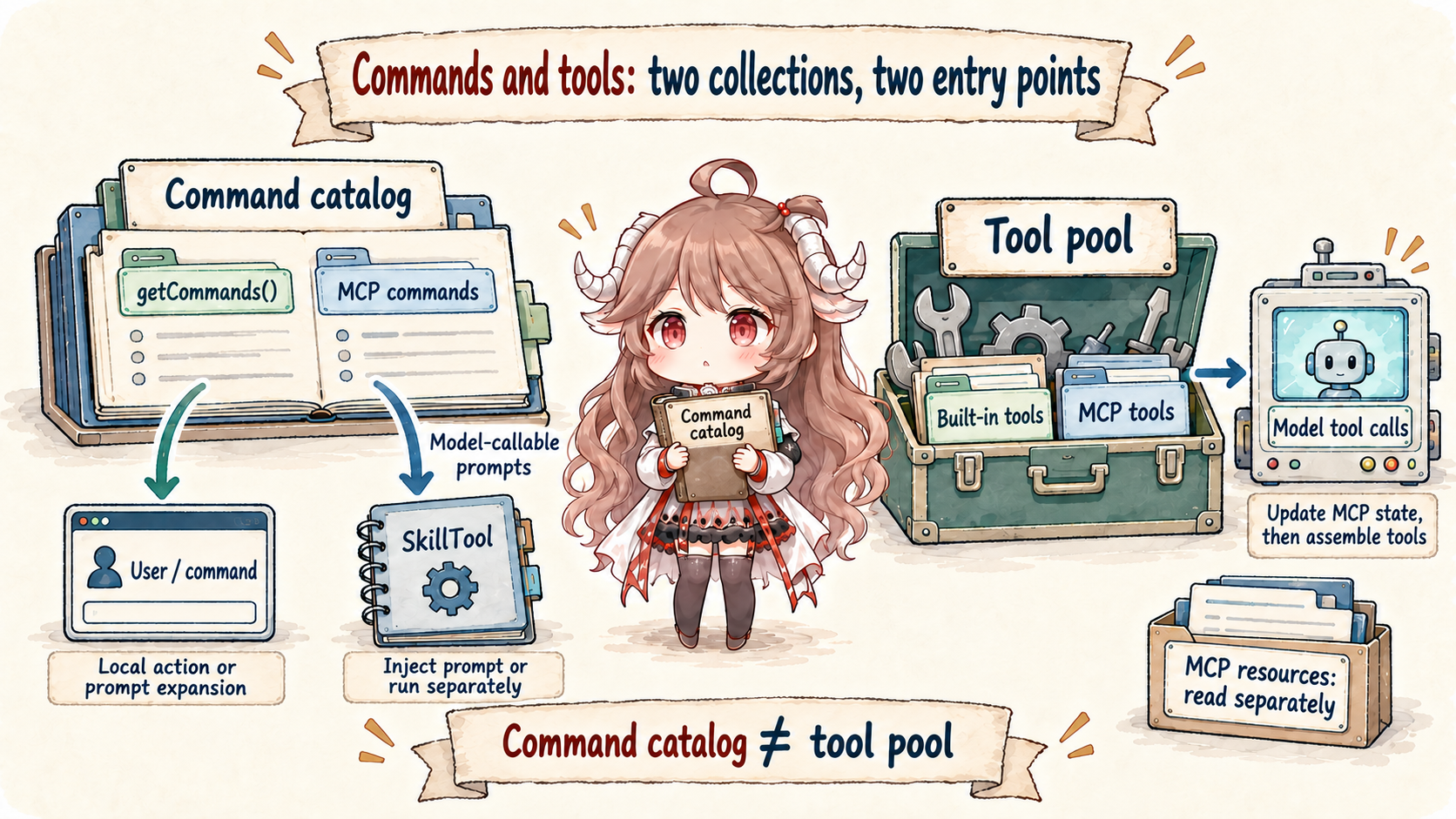
This implementation analysis is limited to the public mirror snapshot dated March 31, 2026. The mirror is not an official Anthropic source repository and does not establish behavior in later product releases. Source links are pinned to that commit; official documentation supplies product concepts, while feature gates and missing modules are identified separately.
A user sees many ways to extend Claude Code: /init, project Skills, plugin commands, MCP prompts, MCP tools, and built-in tools. The client has to load each source, remove duplicates, check current availability, and place the result where either the user or the model can invoke it.
Reading goal: trace each capability to one of two destinations—the command table used when a person types /..., or the tool pool whose schemas are sent to the model. Then follow what happens when the user or model invokes it.
getCommands(cwd)
  -> built-in commands
  -> user / project commands
  -> plugin commands
  -> skill-backed commands

AppState.mcp.commands -> command table / eligible MCP skills
AppState.mcp.tools -> model-facing tool pool
AppState.mcp.resources -> resource map / resource-reading tools1. Start with two collections: commands and tools
getCommands() builds a command table from bundled Skills, built-in plugin Skills, project and user Skill directories, workflow commands, plugin commands, plugin Skills, and Claude Code's built-in commands. assembleToolPool() and mergeAndFilterTools() build the tools that may be sent to the provider. MCP can contribute to both: its prompts can become commands, while its tools join the tool pool.
Loading from disk is memoized by working directory because filesystem reads and plugin imports are expensive. Availability is still checked on every call, because login state, provider selection, and feature switches may change during a session. Claude Code can reuse the loaded records without assuming that every record remains visible. Runtime-discovered Skills are filtered for availability too, deduplicated against existing names, and inserted before built-in commands. They cannot replace an existing command with the same name.
| Source | Destination | Use |
|---|---|---|
| Built-in commands | Command table | Client commands such as /help and /compact. |
| Local, bundled and plugin Skills | Command table; eligible SkillTool index | Prompt capabilities invoked by the user or model. |
| MCP prompts / Skills | AppState.mcp.commands | Server-provided prompts merged into the command view. |
| MCP tools | Tool pool | Tool schemas and external server actions. |
| MCP resources | Resource map | Resources available to context assembly or reading tools. |
2. A slash command can stay local or create a model message
parseSlashCommand() separates the command name from its arguments, and processSlashCommand() looks it up in the current command table. If no command matches, the parser still checks whether the text looks like a path or ordinary input instead of blindly reporting an unknown command.
Matched commands have three important forms. A local-jsx command loads an Ink interface and returns through callbacks. A local command runs client code and records its stdout or stderr. A prompt command produces messages for the model, or starts a forked sub-agent when its context is fork. This is why typing a slash command does not always cause an API request.
| Matched command type | Execution | Next step |
|---|---|---|
| local-jsx | Load local UI and return through a callback. | A callback need not request a model turn. |
| local | Execute a local function and record output. | Local output is not itself a model turn. |
| prompt | Expand a prompt or run context: fork. | Use prompt messages or a separate agent. |
A prompt command may specify model, effort, and allowedTools. Here a turn can include several model requests and tool calls. allowedTools supplies permission allowances, not an exhaustive tool list: the REPL writes alwaysAllowRules.command once per turn and clears it with an empty list on the next non-Skill turn. This happens even before a fork command returns with shouldQuery=false, preventing stale allowances from leaking. Effort is applied through the current context's state reader without changing the global store.
For example, allowed-tools: Read lets Read match an automatic permission allowance during the Skill turn. It does not remove Bash from the tool pool. Bash still receives its own permission decision, and the next ordinary user turn does not inherit the Skill's Read rule.
3. SkillTool lets the model invoke selected prompt Skills
SkillTool is itself a regular tool. The model supplies a Skill name and optional arguments; the client finds the matching command, validates it, checks permission, and expands its prompt. The lookup combines local commands with MCP commands marked as prompts, but validation rejects missing Skills, commands with disableModelInvocation, and commands whose type is not prompt.
Permission checks still apply. SkillTool.checkPermissions() evaluates deny and allow rules, permits Skills that use only safe properties, and otherwise returns ask with a suggested rule update. If the Skill declares context: fork, Claude Code starts a sub-agent and returns its result. Otherwise, it injects expanded messages and chains a contextModifier that merges the Skill's allowances into the current context and applies model and effort overrides. It does not write these changes to settings on disk.
4. MCP capabilities first become application state
An MCP server does not write tools directly into a provider request. useManageMCPConnections() connects clients, fetches tools, prompts, and resources, and stores them in AppState.mcp. Its update code batches rapid server changes: clients are replaced by name, old tools and commands from the same server are removed before refreshed ones are added, and resources are stored by server name.
Each advertised MCP tool is adapted to Claude Code's normal Tool shape with a qualified name, schema, description, call function, and permission behavior. Once wrapped, it uses the same hooks, UI rendering, output handling, and paired tool_result behavior as built-in tools.
5. Each query reads the latest state
Before a request, getToolUseContext() reads the store again instead of trusting React state captured by an older closure. That matters because an MCP server may finish connecting after the component rendered. computeTools() then combines built-in and MCP tools, applies deny rules, removes duplicate names, and keeps built-in tools ahead of MCP tools.
The stable ordering also protects prompt-cache reuse. If newly connected MCP tools were inserted throughout the built-in list, many later tool-schema positions—and therefore the cached prefix—would change. Immediately before query(), the REPL uses the latest tools and MCP clients again when constructing the system prompt, so the description sent to the model matches the tools the runtime can execute.
6. Compare the three entry points
| Entry point | Who triggers it | What is checked | Observable result |
|---|---|---|---|
| Slash command | The user types /name. | The current command table and command type. | Local UI, local output, a prompt message, or a forked sub-agent. |
| SkillTool | The model emits tool_use. | Prompt-only eligibility and SkillTool permission rules. | An inline prompt expansion or a forked Skill result. |
| MCP prompts / commands | User or model, depending on command properties. | AppState.mcp.commands and invocation eligibility. | Slash-command view or SkillTool index. |
| MCP tool | The model emits tool_use. | The current MCP state, tool filters, and normal tool permissions. | An external server call followed by a paired tool_result. |
The practical rule is simple: a file on disk or a configured server is not automatically present in the current request. Claude Code must load it, confirm that it is available, place it in the command table or tool pool, and apply the relevant permission checks when it is invoked.
Sources
The source-code claims in this article are based on the public mirror and the linked official documentation. MCP server internals are not inferred from client-side code.