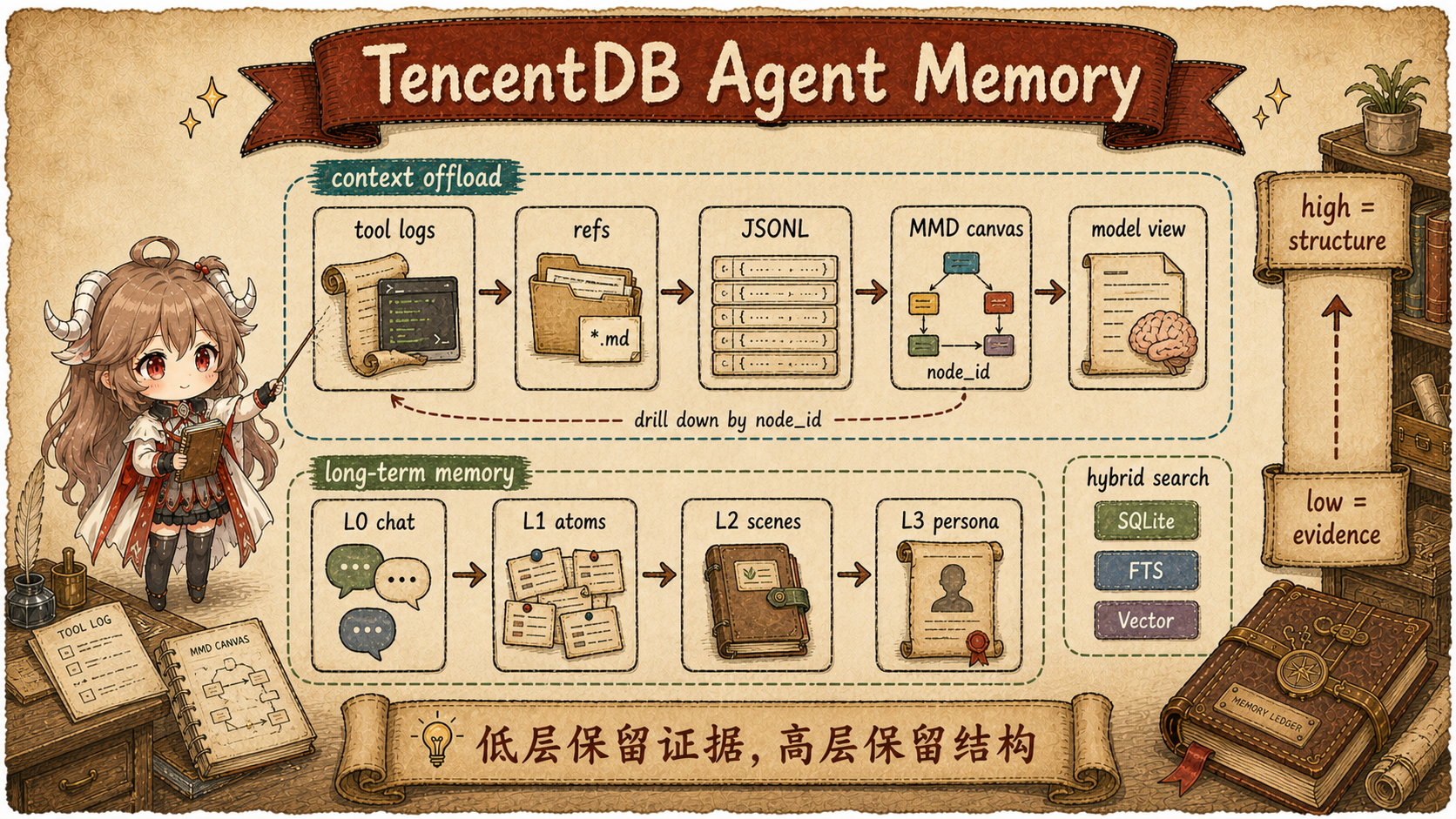
If memory only means “put old chat back into the prompt,” TencentDB-Agent-Memory looks crowded. It has Context Offload, L0-L3, Gateway, MemoryCore, Memory Hub, Memory Proxy, Skill, Wiki, CodeGraph, ACL, and Loadout. The simpler reading is this: the project keeps asking what is worth preserving and why the next agent is allowed to use it.
Lifecycle of one reusable experience:
  1. A task produces thick logs, errors, fix steps, and documentation clues
  2. v1 keeps raw evidence and replaces bulky prompt content with drill-down summaries
  3. v1.0 moves the memory engine into a standalone Gateway that other agents can call
  4. v2 registers Chat Memory / Skill / Wiki / CodeGraph as team assets
  5. Memory Hub controls owner, visibility, version, status, and bindings
  6. Memory Proxy injects only the assets this agent is allowed to use before the next model call
The path, rather than an endpoint catalog, shapes this chapter: why v1 needed Context Offload and L0-L3, what v1.0's Gateway split changed, and why v2 Team Memory needs assets, permissions, and proxy injection.
| Term | Plain Reading for This Article |
|---|---|
| Context Offload | Move bulky tool output out of the prompt while keeping summaries, task nodes, and links back to raw evidence. |
| MMD | A Mermaid task graph that represents progress with a few nodes and links those nodes back to tool calls. |
| Memory Hub | The team console that manages owner, visibility, status, version, and asset bindings. |
| Memory Proxy | The model-request proxy that injects assets by Team, User, Agent, and Task before the LLM call. |
| Agent Loadout | The set of assets one Agent may carry, plus how each asset should enter context. |
What you should be able to explain.
v1 handles one agent's long-task pressure. v1.0 frees the memory engine from a single host plugin.
v2 handles how people and multiple agents reuse experience without exposing private assets. The
/v3/* routes in the docs are API-version routes, not a “product v3”.
Source scope.
The v1 side uses v1.0.1
and the v1.0.0/v1.0.1 changelog.
The v2 release side uses the v2.0.0 release notes
and v2.0.1 release notes.
The current team-branch implementation snapshot is
0468a2a.
feat/server is closer to the v1.0.x Gateway line; feat/server_team is the v2 Team Memory line.
1. First separate the release lines
1.1 v1 starts with one agent's context pressure
A coding agent's context grows for two reasons. The first is current-task tool output: test logs, search results, file snippets, and stack traces. These are bulky, yet often only one raw line matters later. The second is cross-session information: user preferences, project decisions, and stable constraints. v1's core move is to handle them separately: offload bulky task material first, then distill long-term information layer by layer.
The Context Offload file layout is explicit. Different agents get separate directories. The same agent
shares mmds/, refs/, and state.json. Each session has its own
offload-<sessionId>.jsonl. The comment is at the top of
storage.ts,
and the path construction sits in
createStorageContext.
export interface StorageContext {
  readonly dataRoot: string;
  readonly dataDir: string;
  readonly refsDir: string;
  readonly mmdsDir: string;
  readonly offloadJsonl: string;
  readonly stateFile: string;
  readonly agentName: string;
  readonly sessionId: string;
}
A tool result does not disappear. Raw text goes into refs/*.md, the index and summary go into
JSONL, and multiple tool steps are merged into an MMD task graph. The model normally reads summaries and
the task graph. When it needs evidence, it can drill back through result_ref or
node_id. That is safer for coding tasks than one-way summarization, because a single failed
test line may matter more than the sentence “tests failed.”
1.2 The actual offload happens before the model call
After v1 offload writes files, it rewrites the message array before the next model call.
The comment in before_prompt_build describes three phases: replay confirmed replacements and
deletions, run full L3 compression if token thresholds still require it, and inject MMD into messages. See
the hook summary
and the fast-path replacement logic.
Before the model sees messages:
  1. confirmed replaceable tool_result → summary
  2. older tool messages above the aggressive threshold → delete
  3. deleted task progress → represented by history MMD
  4. current active MMD → injected into this turn
This is how token reduction and traceability coexist. The model does not carry every raw tool log in every turn, but the task graph still tells it what happened. If the summary is not enough, the raw path remains.
1.3 L0-L3 handles long-term memory; team sharing comes later
The long-term side is layered too. L0 is raw conversation, L1 is searchable facts, L2 is scenes, and L3 is persona or core profile. During recall, the code places L3 persona, L2 scene navigation, and the memory tool guide in a relatively stable system area, while turn-specific L1 hits go into the user-prompt prefix. See the auto-recall summary and context assembly code.
// stable: persona / scene navigation / memory tools guide
const appendSystemContext = stableParts.length > 0
  ? stableParts.join("\n\n")
  : undefined;

// dynamic: L1 relevant memories for this turn
return { prependContext, appendSystemContext };
That already makes one agent more aware of the user and the task, while team questions remain open. Who owns a generated Skill? Can a team admin read another user's private memory? Which Wiki and CodeGraph should the Reviewer Agent carry by default? These questions exceed L0-L3. v2 turns memory records into memory assets.
2. v1.0 first pulls memory out of the plugin
2.1 A plugin-bound memory engine is hard for other agents to reuse
The v1.0.0 changelog states the shift directly: the project moves from an OpenClaw-specific plugin to a general memory service for all agents. The memory engine becomes a standalone Gateway process with a v2 HTTP API, TypeScript SDK, Python SDK, and OpenClaw / Hermes adapters. See the v1.0.0 release notes.
| Stage | Main Change | Problem Solved | Why the Next Step Is Needed |
|---|---|---|---|
| v0.x / v1 local plugin | Context Offload, L0-L3, SQLite / file storage, OpenClaw / Hermes entry points. | One agent can survive long tool-heavy tasks and recall cross-session user context. | The capability is still tied to host plugins; other agent frameworks need a standard service entry. |
| v1.0 Gateway | Standalone process, v2 HTTP API, SDKs, Docker, and observability metrics. | Memory moves beyond one host plugin. Other agents can call it through APIs. | APIs share the engine, but team work still needs owner, ACL, review status, and Agent Loadout rules. |
| v2 Team Memory | MemoryCore, Memory Hub, Memory Proxy, four asset types, ACL, and Agent Loadout. | People and agents can reuse experience while preserving owner, permission, and binding boundaries. | The next work is client coverage, cold start, session commands, and write-side controls; v2.0.1 fills in that experience. |
That makes feat/server the service-split line. Its key value is extracting the memory pipeline
from the OpenClaw plugin into a service other callers can use. The team
asset, Hub, and Proxy work continues on feat/server_team.
2.2 Team collaboration needs asset boundaries
An API can let multiple clients reach one memory engine, but team collaboration needs more rules. Should a Skill generated during one engineer's debugging session be visible to the whole team by default? Can one agent read another agent's user persona? Should Wiki and CodeGraph be bound by project, team, or agent? Those questions sit in asset management, where plain memory CRUD has no stable answer.
v2 starts there: reusable experience is registered as assets. Memory Hub manages ownership and visibility. Memory Proxy assembles context for the current Team, User, Agent, and Task before the model call.
3. v2 upgrades memory into team assets
3.1 Four asset types cover experience, docs, code, and chat
The v2.0.0 release notes define the new product position: agent experience, documents, and code become reusable assets so the next agent can pick up existing work. The four asset types are Chat Memory, Skill, Wiki, and CodeGraph. See the v2.0.0 asset description. At this point, “memory” expands from chat facts to reusable work assets.
| Asset | Where It Comes From | How the Next Agent Uses It |
|---|---|---|
| Chat Memory | Preferences, facts, decisions, and history from conversations. | Recover long-term user, task, and team context. |
| Skill | Successful task steps, triggers, validation rules, and resource files. | Apply or inspect an SOP when a similar task appears. |
| Wiki | Product docs, design notes, runbooks, and related documents. | Read structured pages and links instead of wandering through raw docs. |
| CodeGraph | Repository symbols, files, call relationships, and impact paths. | Check callers, callees, and impact analysis before editing code. |
In the debugging example, logs and dialogue become Chat Memory. The stable release-check procedure can become a Skill. Project README files, architecture notes, and runbooks become Wiki. Repository symbols and calls become CodeGraph. They originate in different places, but v2 puts them under one asset framework.
3.2 Asset records make owner, status, and visibility explicit
Team memory cannot be vague. A system that seems to share experience may accidentally inject personal
dialogue, unreviewed steps, or stale documentation into the wrong agent. v2's metadata types move that
boundary into fields. AssetEntity records team_id, asset_type,
owner_user_id, version, visibility, status, and
content_ref. FixedAssetBindingEntity binds an asset to an agent with an injection
mode and priority. See
asset types and injection modes
and asset and binding entities.
export type AssetType = "skill" | "llm_wiki" | "code_graph" | "chat_memory";
export type AssetVisibility = "private" | "team" | "restricted" | "agent" | "task";
export type InjectionMode = "direct" | "summary" | "tool" | "reference";

export interface AssetEntity {
  asset_id: string;
  team_id: string;
  asset_type: AssetType;
  owner_user_id: string;
  version: number;
  visibility: AssetVisibility;
  status: AssetStatus;
  content_ref?: string | null;
}

export interface FixedAssetBindingEntity {
  agent_id: string;
  asset_id: string;
  injection_mode: InjectionMode;
  priority: number;
}
Asset lifecycle for a debugging Skill:
1. Coder Agent finishes a connection-pool timeout debugging flow
2. The system creates a Skill, owner_user_id points to the creator, status starts as draft / candidate
3. After review, status becomes approved, and version can increase when the Skill changes
4. The owner changes visibility to team, or uses restricted + ACL for narrower sharing
5. Release Agent binds this Skill through FixedAssetBinding
6. On a later request, Proxy checks permission and Loadout before injecting the Skill
The type shape tells the story: an asset has ownership and version before it can enter an agent's context.
A Skill may start as draft or candidate and become team-visible only after review.
A private Chat Memory still belongs to its owner and does not become visible simply because the user is in
the same Team.
3.3 Permission is finer than “same team”
Permissions are implemented as a pure function in permission-checker.ts. The sequence is:
asset availability, owner, team membership, visibility, role defaults, and explicit ACL. See the
design note
and checkPermission.
A read decision:
  asset missing or archived         → deny
  user is owner                     → allow
  user is not an active team member → deny
  visibility = private and not owner → deny
  visibility = restricted           → check user / role / agent ACL
  role default covers this action   → allow
  explicit ACL matches              → allow
  otherwise                         → deny
The strict private rule matters: a team admin cannot directly read someone else's private
asset. Sharing requires the owner to change visibility or grant access. Binding assets to agents has a
separate rule: team and agent assets can bind within the same team,
private requires the same owner, and task / restricted cannot become
fixed bindings. See canBindAsset.
4. Memory Proxy carries team assets into different agents
4.1 Multi-client support goes through Proxy, not per-agent plugins
v2.0.0 introduces Memory Proxy for Anthropic and OpenAI protocol paths. v2.0.1 adds OpenCode, DeepSeek Harness, Codex CLI, WorkBuddy, and smoother first-run / reset flows. See the v2.0.0 Proxy notes and the v2.0.1 client list. README_CN describes the usage plainly: one Proxy, unchanged protocol, point the agent's base URL at the Proxy. See the multi-agent setup section.
On the first request, Proxy asks the user to choose Team, Agent, and Task, then stores that binding. On later turns, Proxy uses the binding to get the current agent's loadout: which Chat Memory, Skill, Wiki, and CodeGraph assets can be used, which should be injected directly, and which should appear as tools or references.
4.2 The injection pipeline normalizes protocol messages
The InjectionPipeline file comment gives the shortest path: raw body → Adapter.parse() →
AgentContext → execute hooks → Adapter.serialize() → modified body. The implementation chooses a protocol
adapter, parses a shared AgentContext, runs hooks at injection points, and serializes back to
the original protocol. See the
pipeline comment
and process flow.
Proxy on every model request:
  1. Identify agent profile from URL path or the system prompt
  2. adapter.parse(body) produces AgentContext
  3. Run system.prefix / system.before_tools / system.after_tools / user.* hooks
  4. Hooks return ContextBlock values for Chat Memory, Skill, Wiki, CodeGraph, and related assets
  5. Prefer profile anchors for precise placement; fall back to generic injection points
  6. adapter.serialize(ctx) rebuilds an upstream-compatible request
A minimal request shape:
Before injection
system: base rules for the Agent
user: help me debug connection-pool timeouts
After injection
system: base rules for the Agent
<session_context>current Team / Agent / Task</session_context>
<available_skills>release-check Skill summary or full text</available_skills>
<user_memory>relevant Chat Memory</user_memory>
<knowledge>readable Wiki / CodeGraph summary or reference</knowledge>
user: help me debug connection-pool timeouts
InjectionMode controls the shape of that entry. direct and summary
usually place text in the prompt. tool and reference tell the Agent that a
callable tool or drill-down reference exists. The same asset can therefore travel as full context, a
short summary, or a recoverable clue.
Injection does not have to recompute everything on every turn. A hook can declare
cacheStrategy: none executes every time, session_init reads prewarmed
blocks, and hybrid merges cached blocks with fresh blocks. See the
hook execution order
and cacheStrategy branches.
If a hook declares an anchor, the pipeline first tries to land content in that agent profile's semantic
slot. If the slot cannot be resolved, it falls back to the generic injection point. See
applyInjection.
4.3 The Codex path shows how Proxy adapts a new protocol
After v2.0.1 adds Codex CLI support, the code includes a dedicated Responses API handler.
The header of codexHandler.ts says it handles POST /v1/responses and treats
/responses/compact, /memories/trace_summarize, and /realtime/calls
as auxiliary passthrough requests. Only the main request enters session-init, asset injection, and forward.
See the Codex handler comment
and auxiliary classifier.
The Codex injection implementation is especially useful to read. It builds a synthetic OpenAI body, runs
the existing injection pipeline on it, lets the pipeline append asset blocks to the system message, then
extracts that text and wraps it in <tdai_injections> for the Responses API body. That
reuses the old hooks, cache, prewarm, and injectors instead of building a separate Codex-only asset system.
See Codex asset injection.
5. The write side also gains team boundaries
Read-side ACL and Loadout prevent unauthorized assets from entering the model request. The write side has a different risk: noisy runtime context, temporary task state, or high-risk experiment output can become a team asset if extraction is too eager. The next two mechanisms still belong to the v2 team boundary: one cleans the L0 user question, and one gives extraction a global switch plus an allowlist.
5.1 L0 writes only the real user question
Team memory must be clean on read and clean on write. In the current team branch, the comment in
tdai/recorder.ts explains the problem: coding agents such as CodeBuddy, Claude Code, and DSH
often put harness context inside the user message, including <additional_data>, system
reminders, and runtime snapshots. Writing the whole user message to L0 would pollute memory with noisy,
changing runtime context. The recorder extracts the real question from the last user message, then writes
that to L0. See the write motivation
and recordTdaiTurn.
export function extractLatestUserMessage(messages: unknown[]): TdaiMessage | null {
  for (let i = messages.length - 1; i >= 0; i--) {
    const msg = messages[i] as Record<string, unknown>;
    if (msg?.role !== "user") continue;
    const content = extractUserQueryText(extractContentText(msg.content));
    if (content.trim()) return { role: "user", content };
  }
  return null;
}
This detail matters. If a memory system treats runtime noise as user fact, smarter retrieval will only retrieve dirtier records. Write-side cleaning is a prerequisite for recall quality.
5.2 Reads and writes can be controlled separately
The injection pipeline governs the read side: what context enters the model on each turn. The write side
later gets a smaller extraction-gate. Configuration can disable all extraction or allow only
named extractors such as skill or tdai-memory. Missing or malformed config stays
permissive to preserve historical behavior. See the
design comment
and predicate.
That creates a useful production mode: keep injecting team assets to help the agent work, but temporarily stop writes during load tests, migrations, demos, or high-risk tasks where temporary content should not enter team memory.
5.3 Answering the user and extracting memory can use different models
The extraction gate decides whether to organize memory; instance upstream configuration decides which model does the work.
A team can keep the existing model for a Codex conversation while sending internal memory extraction to a separately configured service.
Configuration separates conversation from extraction. Resolution first matches the Agent source and type,
then falls back to default for that type. The Codex main request reads the former;
the internal system-user extraction forwarding path reads the latter.
This separates request purposes; the ACL and bindings described earlier still determine access to team assets.
| Mode | What instance configuration changes | Allowed for extraction |
|---|---|---|
official | Leaves existing upstream selection unchanged. | Yes. |
custom_unified | Uses the instance URL and shared API key; main requests can replace the model from configuration. | Yes. |
custom_passthrough | Changes the URL while retaining the authorization header already present at this override step. | No; rejected when saving configuration. |
After changing extraction configuration, observing the model that answers the next user message does not establish whether extraction has changed. Proxy caches configuration per instance for five minutes without extending expiry on reads. A failed refresh uses the last successful value; an initial failure applies no instance override. Changes therefore have a visibility delay, and an outage can keep the old model in use. Diagnose main conversations and internal extraction separately, checking the actual forwarding destination. See the cache and resolution functions and validation on save.
6. API v3 is the isolation contract inside the v2 product
One easy misread is the appearance of /v3/* routes inside the v2 product line. The MemoryCore
API doc says v3 is RPC-style. Data-plane routes accept team_id, agent_id,
user_id, and task_id from body or headers, and enforce team + agent + user
isolation. The catalog covers L0-L3, Skill, Knowledge, Chat-Memory, Memory-Prompt, Generation-Log, Meta,
and related modules. See auth and isolation fields
and API catalog plus conversation/add.
Read this “v3” as an API version. The product line is more precise as: v1 local memory → v1.0 Gateway service split → v2 team assets. API v3 is the interface generation inside the v2 system that carries identity isolation and module boundaries.
7. Where it sits in the Agent Memory series
The most memorable part of TencentDB-Agent-Memory is that it covers two paths at once. The runtime-context path explains how tool logs leave the prompt, how summaries and MMD represent task progress, and how raw evidence remains recoverable. The team-asset path explains how Chat Memory, Skill, Wiki, and CodeGraph gain owners, visibility, status, and agent bindings.
| Project | Main Question in This Series | Where TencentDB-Agent-Memory Fits |
|---|---|---|
| Mem0 | How long-term memory is extracted, deduplicated, ranked, and recalled. | TencentDB also handles long-term memory, but emphasizes tool logs, team assets, and Proxy injection. |
| LangMem / LangGraph | Whether memory writes belong in the hot path or in background processing. | TencentDB puts writes, injection, and current-task offload beside the agent runtime. |
| OpenViking | How Memory, Resource, and Skill enter one context tree. | TencentDB uses assets and loadout for sharing; OpenViking feels closer to a unified resource filesystem. |
| Cognee / Supermemory | How knowledge processing platforms and context APIs serve multiple callers. | TencentDB is closer to coding-agent request proxying, permission assembly, and team collaboration. |
If you only read v1, TencentDB-Agent-Memory looks like an engineering-heavy local memory plugin: tool output and long-term persona both become traceable layers. After v2, the focus changes: it tries to turn what agents have done into assets a team can review, authorize, bind, and reuse. That is why it is heavier than a simple vector-memory layer. The weight comes from ownership, permission, versioning, binding, and injection placement, not decorative architecture.
Sources
- TencentCloud/TencentDB-Agent-Memory
- v1.0.0 / v1.0.1 changelog: Gateway, v2 API, SDKs, and adapters
- v1.0.1 Context Offload storage
- v1.0.1 before_prompt_build compression flow
- v1.0.1 auto-recall and stable/dynamic context
- v2.0.0 release notes: four assets, Memory Hub, Memory Proxy, SDK v3
- v2.0.1 release notes: more agent clients, cold start, Skill, and Hub improvements
- MemoryCore metadata types: Asset, Visibility, Binding
- MemoryCore permission checker
- MemoryProxy InjectionPipeline
- MemoryProxy Codex Responses handler
- TDAI L0 recorder: write only the real user question
- MemoryProxy extraction gate
- MemoryCore v3 API: auth, isolation fields, and data-plane routes