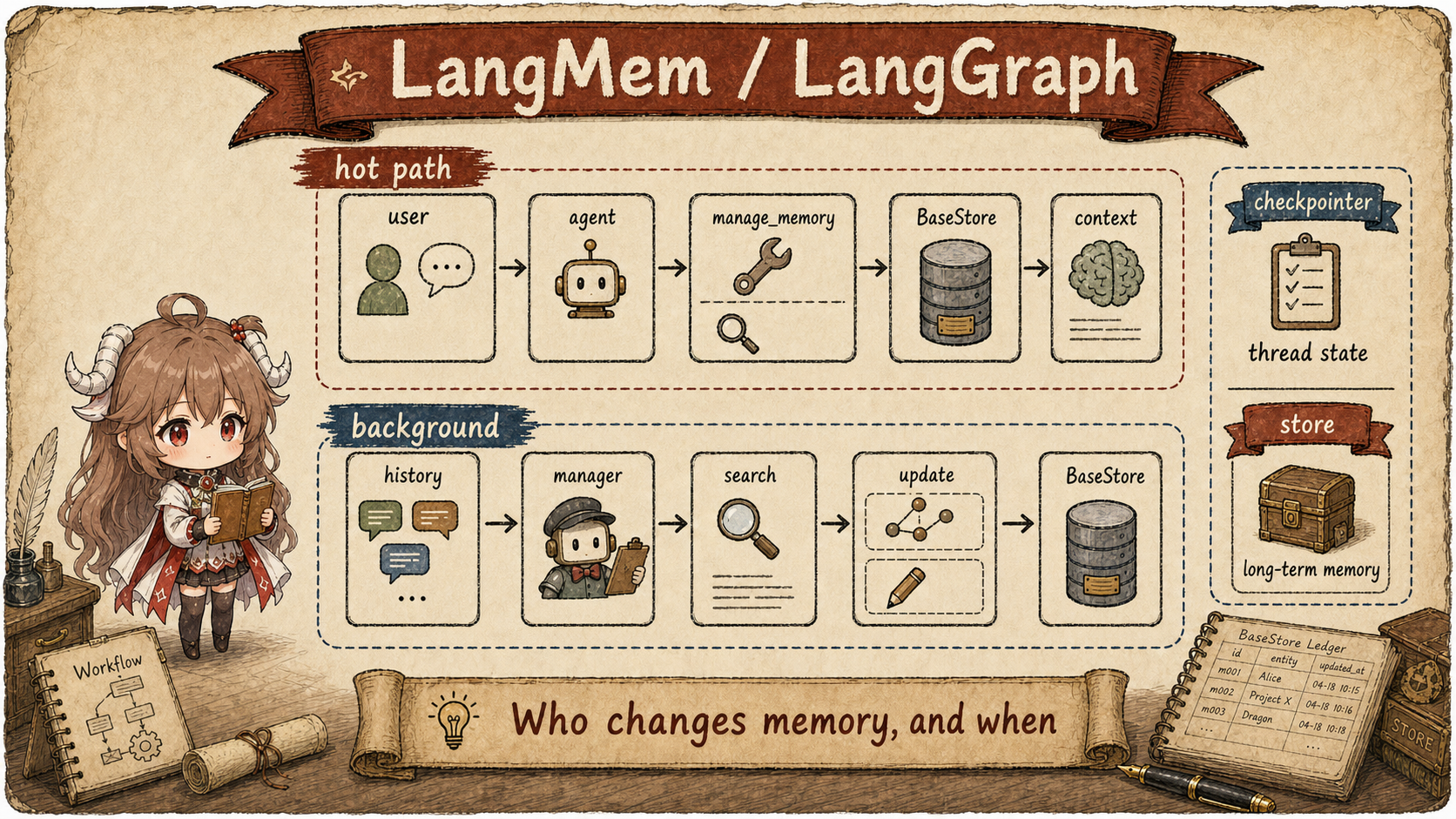
The same user preference behaves differently depending on the execution path. If the agent calls a tool immediately, the write is visible and controllable, but it consumes model attention and tool budget. If a background manager processes the conversation later, the main turn stays cleaner and consolidation is easier, but the system has to handle eventual consistency when the user asks about the preference right away.
Questions this article answers.
By the end, you should be able to explain where LangMem hot path tools write, why LangGraph separates
store from checkpointer, how the background manager searches old memories before
applying updates, and when to choose synchronous tools versus background consolidation in your own agent.
The representative unit in this chapter is one preference: “answer me in English by default.” It can be written immediately on the current answer path, or it can wait until a background manager reads the conversation snapshot plus similar old memories. Both paths can be correct. The difference is when the preference becomes visible, how old state is merged, and whether a failure interrupts the current answer.
| Question | Current-turn path (hot path) | Background cleanup path |
|---|---|---|
| Who triggers the write? | The current agent calls manage_memory. |
A background flow receives a conversation snapshot. |
| When is it visible? | After the write succeeds, the next search or prompt can see it. | Only after background work lands it in the long-term store. |
| Who merges old state? | The current agent decides before calling the tool. | The manager retrieves similar old memories before consolidating. |
| Main risk | Interrupts the answer and consumes tool/model attention. | Eventual consistency; the user may ask about the preference immediately. |
Source scope. This article uses only public README, docs, and source from langchain-ai/langmem and langchain-ai/langgraph. LangGraph Platform store behavior is described from public docs, not inferred private server internals.
1. LangMem splits memory into two execution paths
1.1 The same memory behaves differently in the foreground and background
LangMem's README names the two routes directly. It provides memory management tools that agents can use to record and search information during active conversations, in the hot path. It also provides a background memory manager that automatically extracts, consolidates, and updates agent knowledge. Both routes integrate with LangGraph's Long-term Memory Store. The positioning is in the README feature list.
This is not a minor implementation choice. If a user says “answer me in English from now on,” a hot-path write can take effect on the next turn, but the model must spend attention and tool budget on the memory write. A background manager keeps the main answer cleaner and can merge multiple signals later, but the user may immediately ask why the preference has not been applied yet. LangMem's useful move is making both personalities explicit execution paths.
Same sentence: "answer me in English from now on"

Hot path:
  the current agent decides this is a durable preference
  -> calls manage_memory to write into BaseStore
  -> the next prompt / search_memory call can retrieve it immediately

Background:
  the current agent answers normally
  -> the conversation slice is processed later by a manager
  -> the manager searches old preferences and chooses add or update
  -> the result is written back into BaseStore
The rest of the mechanism is easier to read through this example. Hot path optimizes for “remember it
now”; background processing optimizes for “consolidate it carefully.” LangGraph's split between
store and checkpointer decides whether that preference becomes cross-conversation
long-term memory or only recoverable state inside the current thread.
1.2 Decide whether the memory must take effect immediately
The README quickstart makes this concrete. It creates an InMemoryStore with an embedding
index, adds create_manage_memory_tool and create_search_memory_tool to a
create_react_agent, and passes the same store into the agent. The README then
explains that these tools let the agent control what gets stored, and that the LLM can invoke the search
tool for similar past memories. See the
agent creation example
and the follow-up explanation.
| Dimension | Hot Path | Background |
|---|---|---|
| Trigger | The current agent calls a tool during reasoning. | A worker, timer, idle hook, or post-conversation job invokes the manager. |
| Write path | manage_memory directly creates, updates, or deletes. |
The manager searches similar old memories before deciding insert, update, or delete. |
| Read path | The prompt can call store.search(), or the model can call search_memory. |
The consolidated result lands in the same BaseStore and is retrieved normally later. |
| Common failure | The model forgets the tool call, or stores a one-off constraint as a durable preference. | There is a delay before the latest information reaches long-term store. |
2. Hot path: the Agent decides what to remember
2.1 The manage tool is a model-initiated side effect
The hot path quickstart starts with the distinction: memories can be created while the agent consciously
saves notes using tools, or extracted automatically in the background. Its example prompt calls
get_store() to access the store configured for the current graph run, searches
store.search(("memories",), query=...), and inserts the results into a
<memories> system-message section. The agent is then created with
create_manage_memory_tool, store, and checkpointer. The route is
shown in the hot path definition
and agent example.
def prompt(state):
    store = get_store()
    memories = store.search(
        ("memories",),
        query=state["messages"][-1].content,
    )
    return [
        {"role": "system", "content": f"<memories>\n{memories}\n</memories>"},
        *state["messages"],
    ]

agent = create_react_agent(
    model,
    prompt=prompt,
    tools=[create_manage_memory_tool(namespace=("memories",))],
    store=store,
    checkpointer=checkpointer,
)
Two things matter in this snippet. Retrieval is explicit: the prompt function searches the store with the
latest user message and puts the matching memories back into the system message. Writing is not automatic:
only when the agent decides that "answer me in English from now on" should be durable does it call
manage_memory. The benefit is auditability in the tool trace, plus a better chance to separate
durable preference from one-off task context.
2.2 The search tool puts long-term memory into the current model input
The tool implementation is equally direct.
create_manage_memory_tool
ships with default instructions to call the tool when the model identifies a new user preference, receives
an explicit request to remember something, wants to record important context, or notices that an existing
memory is incorrect or outdated. At execution time,
amanage_memory
resolves the namespace; deletes call store.adelete(), while creates and updates call
store.aput() with JSON-serializable content.
async def amanage_memory(content=None, action="create", *, id=None):
    namespace = namespacer()
    if action == "delete":
        await store.adelete(namespace, key=str(id))
        return f"Deleted memory {id}"

    id = id or uuid.uuid4()
    await store.aput(
        namespace,
        key=str(id),
        value={"content": _ensure_json_serializable(content)},
    )
    return f"{action}d memory {id}"
The tool has a narrow job. It does not invent a separate memory database. It stores the model's
chosen content under a LangGraph BaseStore namespace. The id decides
whether this is a new item or an overwrite, and delete must point at an existing memory id.
Search follows the same pattern.
create_search_memory_tool
exposes query, limit, offset, and filter, then calls
store.asearch(namespace, query=..., filter=..., limit=..., offset=...). The hot path is
therefore not hidden background magic. It turns memory write and memory search into model-callable tools.
async def asearch_memory(query, *, limit=10, offset=0, filter=None):
    namespace = namespacer()
    memories = await store.asearch(
        namespace,
        query=query,
        filter=filter,
        limit=limit,
        offset=offset,
    )
    return utils.dumps([m.dict() for m in memories])
This is also how to answer questions about BM25, RRF, or hybrid retrieval without guessing. In this tool
path, LangMem delegates retrieval to the configured BaseStore: the tool passes
namespace, query, filter, and pagination parameters. Whether the
actual behavior is embedding search, exact filtering, or a database adapter's richer capability depends on
the store implementation and index configuration.
This is different from an application that always retrieves memories before the model call. In the LangMem hot path, the model may decide to search memory only when the current task needs it, then decide whether to answer or update memory. Long-term memory becomes a workflow capability, not only a fixed prompt-assembly step.
3. Store keeps long-term memory; checkpointer keeps thread state
3.1 BaseStore persists memory across threads and conversations
The hot path guide explicitly separates Store from MemorySaver / checkpointer.
The store can persist arbitrary information under user, agent, organization, or other namespaces, making
it better suited for long-term cross-thread memory. The checkpointer tracks graph state and conversation
history inside each thread for durable execution. The difference is explained in the
hot path quickstart.
LangGraph's source keeps the same split.
BaseStore
is described as a persistent key-value store that can be shared across threads and conversations, scoped
by user IDs, assistant IDs, or arbitrary namespaces. Its
search()
supports namespace prefix, query, filter, limit, and offset; its
put()
stores values by namespace plus key and can control indexing.
class BaseStore(ABC):
    """Persistent key-value store shared across threads."""

    def search(
        self,
        namespace_prefix: tuple[str, ...],
        *,
        query: str | None = None,
        filter: dict | None = None,
        limit: int = 10,
        offset: int = 0,
    ) -> list[SearchItem]: ...

    def put(
        self,
        namespace: tuple[str, ...],
        key: str,
        value: dict,
        index: Literal[False] | list[str] | None = None,
    ) -> None: ...
That is why namespaces are not cosmetic. ("memories", "user_123") can hold one user's durable
preference. ("memories", "org_7", "user_123") can separate organization-level and user-level
scope. The same "answer me in English" preference should live in a personal namespace; in a shared
namespace, it could affect other users.
Long-term does not mean permanent. Current LangGraph
TTLConfig
adds omit_expired: stores supporting it can hide expired items before a cleanup sweep physically deletes them. It defaults to false.
PostgresStore tests cover both settings.
A successfully written preference can therefore disappear from a read because of namespace, retrieval conditions, or expiration policy; that is not evidence that the model forgot it.
3.2 The checkpointer restores execution; it does not store the user profile
In StateGraph.compile(),
checkpointer is described as fully versioned short-term memory that allows pause, resume,
and replay. The same method has a separate store parameter. Runtime also exposes
Runtime.store
as persistence and memory for a graph run, and nodes can access the configured store through
get_store().
That separation keeps recoverable thread state distinct from cross-thread long-term preferences.
graph = builder.compile(
    checkpointer=checkpointer,  # short-term recoverable state for the current thread
    store=store,                # long-term memory shared across threads
)

@dataclass
class Runtime:
    store: BaseStore | None = None
A practical test is: if this state disappeared, would the current task fail to resume, or would the user's long-term preference be lost? The first belongs to the checkpointer; the second belongs to the store. Mixing the two creates predictable problems: user profile data hidden inside a thread checkpoint cannot be seen by another thread, while execution noise written to the long-term store contaminates durable memory.
4. Background manager separates memory processing from its scheduling
4.1 The manager reads a conversation snapshot plus similar old memories
The background quickstart takes the other path. The agent answers normally while a memory manager extracts
and consolidates memories from conversation history. The example creates
create_memory_store_manager(..., namespace=("memories",)), calls the LLM inside an
@entrypoint(store=store) function, then passes the user message plus response to
memory_manager.ainvoke(). The docs also recommend delayed processing for active conversations
to debounce repeated work. See the
background definition,
basic example,
and processing note.
Here “background” first describes a division of work. The quickstart actually awaits
memory_manager.ainvoke(to_process) before returning response.content, so its caller still waits for consolidation.
Moving that latency outside the response requires separate scheduling. An async function or a manager named “background” does not do it automatically.
The key is that the manager does not simply dump a fresh summary into the store. It judges the new conversation together with existing memories. If the user once said “I prefer Python” and later says “I am mostly writing Rust now,” the background path can decide whether to add, update, keep both as scoped facts, or delete an incorrect memory. Its job is to maintain long-term state, not record every sentence.
| Step | What Happens | Why It Is Designed This Way |
|---|---|---|
| 1. Collect slice | The user message and assistant response become a conversation window. | The answer exists; returning it before consolidation depends on scheduling. |
| 2. Search old memory | The manager calls store.asearch() with conversation-derived queries. |
Add-versus-update decisions need the old state in view. |
| 3. LLM consolidation | The memory manager receives conversation messages plus existing memories. | The model can merge, correct, and structure information with more context. |
| 4. Apply changes | Final puts and deletes are written back into BaseStore. |
The long-term store receives cleaned memory, not raw chat noise. |
4.2 The manager consolidates, then applies individual writes and deletes
The manager source has three layers.
create_memory_manager
analyzes conversation messages and existing memories to generate or update structured memory entries,
controlled by enable_inserts, enable_updates, and enable_deletes.
create_memory_store_manager
connects that process to BaseStore: it searches relevant memories, extracts new information, updates old
memories, then writes the changed records. Its data-flow diagram sends conversation history to the
manager, searches the store, asks the LLM to analyze and extract, then applies changes back to the store.
async def ainvoke(self, input, config=None):
    namespace = self.namespace(config)
    search_results_lists = await asyncio.gather(
        *[store.asearch(namespace, query=query) for query in queries]
    )
    store_map = self._sort_results(search_results_lists, self.query_limit)

    enriched = await self.memory_manager.ainvoke({
        "messages": input["messages"],
        "existing": store_based,
        "max_steps": input.get("max_steps"),
    })

    await asyncio.gather(
        *(store.aput(**put) for put in final_puts),
        *(store.adelete(ns, key) for (ns, key) in final_deletes),
    )
Shape-level example: background consolidation writes back to BaseStore
before:
namespace = ("memories", user_id)
key = "pref-1"
value = { "content": "The user prefers Chinese by default" }
conversation snapshot:
"Answer me in English by default from now on"
after manager:
final_puts:
namespace = ("memories", user_id)
key = "pref-1"
value = { "content": "The user wants English answers by default from now on" }
final_deletes: []
Execution follows that chain.
MemoryStoreManager.ainvoke()
resolves the namespace, then either uses a query generator or dilated conversation windows to call
store.asearch() for existing memories. Later it builds final puts and deletes and applies them
through store.aput() / store.adelete().
In other words, the background manager updates memory with old memories in view; it is not just dumping a
conversation summary into storage.
The cost is an inherent consistency window. The short-term thread state already knows what just happened, while the long-term store may still be waiting for consolidation. That is fine for memory that benefits from being more accurate later, such as long-conversation cleanup, repeated-preference merging, or profile cleaning. If the user explicitly asks to remember something now, the hot-path tool better matches the expectation.
These writes are not an atomic transaction across records. The
execution path issues individual
aput and adelete operations through asyncio.gather(), with no shared rollback or separate version-history table.
One operation can fail after another has persisted. Audit history, idempotent retries, and batch rollback require application storage and job handling.
The manager can also write nothing when content is unchanged and there are no deletions.
4.3 Delayed execution requires a snapshot and a scheduler
The local ReflectionExecutor
accepts a payload into an in-process priority queue served by a thread. after_seconds sets the earliest execution time;
a returned Future exposes completion or failure. A new submission with the same thread id attempts to cancel the old task,
but does not merge their messages. The application should supply an independent, complete conversation snapshot for the intended window.
Two submissions for one conversation:
Snapshot 1 = [user requests English answers, Agent response]
Snapshot 2 = [snapshot 1 messages, user adds English code comments, Agent response]

Snapshot 1 still queued → a new submission attempts to cancel it and later processes snapshot 2
Snapshot 1 already writing → cancellation cannot undo effects already applied
Future succeeds and store writes finish → later retrieval can observe the memory
The worker checks cancellation before invoking the reflector; it does not use that signal to interrupt storage operations inside the call. Its queue is in memory, with no durable replay after process failure. Debouncing can reduce pending work, but does not guarantee that only the latest snapshot writes. Reliable background processing needs application-level durable jobs, failure observation, and retry policies.
5. Choose the path
5.1 Decide by latency, observability, and consistency
Hot path tools fit memory actions that should be immediate, user-visible, and easy to audit. If the user
says "answer me in English from now on," the agent can call manage_memory during the turn,
and the next prompt or search can observe it. The tradeoff is a tool call plus the cognitive overhead of
asking the model to manage memory while it is also solving the user's task.
Background management fits post-conversation cleanup, repeated-fact consolidation, structured profile updates, and lower-priority preference extraction. It keeps the main dialogue cleaner and is easier to batch or debounce. The cost is an eventual-consistency window: thread state may already contain the latest exchange while the long-term store has not yet been consolidated.
On the full Agent Memory map, LangMem / LangGraph adds the execution-path dimension. Mem0 is closer to an external memory layer, Letta to agent state, and Graphiti to a temporal graph. LangMem / LangGraph reminds us that long-term memory also needs an answer to which workflow path is allowed to change it. The next chapter on TencentDB-Agent-Memory moves into the current task itself: when tool logs fill the context window, how can the system unload them while retaining the original records needed to recover the task?
Sources
- LangMem README: core features
- LangMem README: agent with memory tools
- LangMem hot path quickstart: two memory paths
- LangMem hot path quickstart: store, tools, checkpointer
- LangMem
create_manage_memory_tool - LangMem
manage_memorywrite path - LangMem
create_search_memory_tool - LangGraph
BaseStore - LangGraph
StateGraph.compile() - LangMem background quickstart
- LangMem
create_memory_store_managerdata flow - LangMem
MemoryStoreManager.ainvoke()