1. Why “read the config file” can stop halfway
A user says, “Read the config file and tell me the database address.” The model quickly proposes read_file,
but a product cannot execute merely because a tool name appeared. Is that path allowed? Must the user approve it?
Does the tool run here, in a browser, or on a remote worker? If the page refreshes during approval, can the same work continue?
Scope that question carefully. The source directly proves how one Agent runtime pauses and accepts a
confirmation result. Browser reconnect, process restart, and provider continuation are three different
recovery levels. “Continue after refresh” exists only when the service layer persists pending tool state and
reattaches it to reply identity; a RedisStorage class name alone is not that end-to-end proof.
A text-in, final-text-out interface cannot answer those questions. The application needs intermediate state, an approval result must return to the original reply, and the tool result must remain paired with the call that requested it. AgentScope treats one reply as a stateful run rather than one model request.
The previous Pi chapter already put provider adapters, the agent loop, tool results, events, and a session tree into a minimal core. AgentScope does not replace that baseline. It takes on more product responsibility: intermediate work becomes observable, side effects become askable and pausable, and the same reply lifecycle can serve multi-user applications. This chapter therefore asks how a minimal Runtime adds permission checks, pause and resume, and service integration—not how to write another Loop.
2. Five parts of one Reply
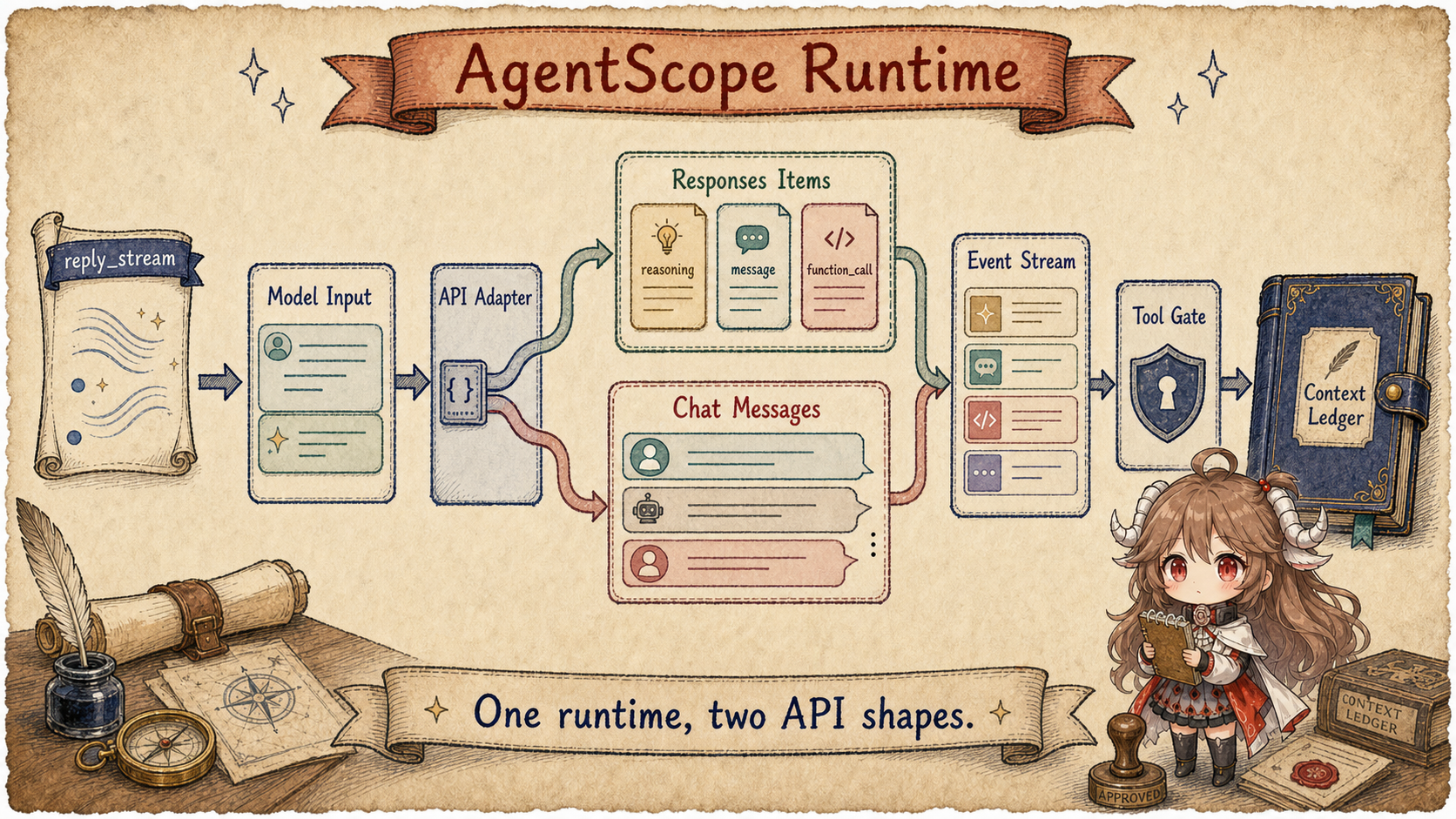
AgentScope is a framework that puts agent replies, tool actions, and application events on one runtime path. Start with five parts:
- Reply: one complete handling of user input, possibly containing several model calls.
- Event: visible progress such as start, model output, approval wait, tool result, and end.
- Msg records: structured user, assistant, Tool Call, and Tool result records for later turns.
- Model adapter: translates one internal message view into each provider's request and back again.
- Tool permission check: validates arguments and chooses Allow, Deny, Ask the user, or external execution.
These are not separate feature boxes. Events report Reply progress, a Tool permission check can pause the Reply, approval resumes it, and the important steps eventually enter the Msg records.
3. How one Reply reaches completion
- The user message enters context; the runtime assigns a
reply_idand emits a start event. - AgentScope assembles system instructions, necessary history, and available tools into one internal model input.
- The adapter translates that input for the provider and normalizes streaming output into internal content blocks.
- When the model requests
read_file, the runtime emits a tool event, validates arguments, and checks policy. - If approval is required, the reply pauses. The user's answer re-enters the same
reply_streamand resumes the call. - The Tool result enters the Msg records; the Model continues, and the Runtime emits an end event when no Tool remains.
Now reply_stream means more than token streaming. It carries a reply lifecycle containing both displayable
content and events that can change execution.
Questions this article answers.
Follow one reply_stream from structured input to Model events, permission-checked Tool execution, and the next
context write. Track how OpenAI Responses API and Chat Completions become different provider payloads while the
upper AgentScope Runtime produces one set of Events and Msg records.
Source scope.
Source links are pinned to the public AgentScope snapshot
5ff52f877de12d66a30d55af279dd4f42b1590f3. OpenAI API semantics are checked against the official
Responses migration guide.
Terms like message records, permission checks, and service integration summarize visible public code, not closed control planes or Model-provider internals.
This chapter answers six questions:
- What does
reply_streampromise, and why does it yield events instead of only a final string? - How does AgentScope structure internal message records, and what do
Msgplus Content Blocks provide? - How do system prompt, summary, context, and tool schemas become one model input?
- Why can a Tool Call pause for permission and resume instead of behaving like a normal function call?
- Where exactly do OpenAI Responses API and Chat Completions differ inside AgentScope?
- Why does the example service show that this is more than a script loop?
4. Which events reply_stream sends
The public reply_stream method is intentionally thin. It accepts Msg, a list of messages, UserConfirmResultEvent, ExternalExecutionResultEvent, or None, then yields every item from _reply that is not the final Msg. The consequence is bigger than the code size: application code does not have to wait for the agent to finish. UI, SSE, logs, and dashboards can subscribe to typed intermediate events. A recovery layer can record and correlate those events, but the source here directly proves reply continuation only inside the same Agent instance. Browser reconnect and process restart still require the service layer to persist an event cursor, pending tool state, and reply identity. Typed events alone do not provide cross-process recovery. Source:
reply_stream.
The state transition lives in _reply_impl. It first checks whether this call is continuing a previous wait for user confirmation or external execution. If not, it handles new messages, creates a fresh reply_id, resets the iteration counter, and emits ReplyStartEvent. Then it enters the reasoning/acting loop: reason when there are no pending tools, execute tools in sequential or concurrent batches when there are, pause on confirmation or external execution, and, for ordinary text replies, make one final model call with tools disabled when the iteration budget is exhausted. That call summarizes existing work, but the end reason remains EXCEED_MAX_ITERS. Structured output has separate grace iterations. The compatibility ExceedMaxItersEvent is deprecated; consumers should inspect ReplyEndEvent.finished_reason. Source:
_reply_impl and _next_action.
That is AgentScope's first runtime owner: it owns the lifecycle of a reply, not just the final text. The EventType enum makes this visible. It covers reply, model call, text/data/thinking blocks, tool calls, tool results, max iterations, user confirmation, and external execution results.
The event enum
is not UI decoration. It is the public runtime boundary.
| External Event | Internal Movement | Why It Matters |
|---|---|---|
ReplyStartEvent |
Writes a new reply_id and resets the iteration counter. |
UI, logs, and storage can group events under one reply. |
ModelCallStart/End |
Prepares messages and tool schemas, then collects usage. | The model call becomes traceable and measurable. |
Text/Thinking/ToolCall block events |
Provider streaming deltas are normalized into content blocks. | The frontend can stream while the backend keeps complete structure. |
RequireUserConfirm |
Marks the tool call as asking before pausing. | Confirmation is agent state, not just a modal dialog. |
RequireExternalExecution |
Marks the external tool as submitted before waiting for a result event. | A browser, worker, or remote executor can own the side effect. |
Put that table onto one tool call and the state shape looks like this. It is a simplified shape for ownership, not a field-for-field copy of the source:
reply_id: "reply_42"
iteration: 1
context += user Msg("read the config file")

model chunk -> ToolCallBlock(
  id: "call_7",
  name: "read_file",
  arguments: {"path": "config.toml"},
  state: "pending"
)

permission decision -> "ask"
pending_tool_call.state = "asking"
yield RequireUserConfirmEvent(reply_id, call_id)

user confirms and reply_stream resumes
pending_tool_call.state = "allowed"
tool result -> ToolResultBlock(id: "call_7", output: "...")
context += assistant Msg([ToolCallBlock, ToolResultBlock])
In that view, reply_stream is not only a streaming
display API. It gives one reply local state: a tool call can pause,
confirmation can flow back in, external execution can return
later, and the final structured result can enter the Msg
ledger before the next model input is prepared.
4.1 Three outcomes for the same call_7
| Decision | Record transition | What the next turn sees |
|---|---|---|
| Allow | State becomes allowed; execute locally, or become submitted while awaiting an external result | ToolResultBlock(call_7, output) |
| Ask → confirm | Persist asking plus a confirmation event; resume still matches reply_42 / call_7 | Execution begins only after confirmation and writes the same call id |
| Deny or invalid arguments | Do not execute; write denial or validation failure as a tool result | The model may explain or repair the call, but cannot pretend it read the file |
Complete the success path too. The tool returns only database.address from config.toml; the
runtime matches it to call_7; the model answers without exposing other secrets from the file.
ReplyEndEvent proves only that the reply lifecycle ended. A business validator or caller must still verify
that the answer exposes only allowed fields.
5. Internal records use Msg and Content Blocks, not chat strings
AgentScope's Msg stores sender name, role, content block list, message id, metadata, timestamps, and usage. The role constrains content: user messages can contain text/data, system messages only text, and assistant messages can carry richer structure. This is heavier than the usual role + content chat record, but it is what lets text, thinking, tool calls, tool results, and data remain structured inside one context ledger. Source:
Msg.
| A plain chat record would mix | AgentScope stores | Why the split matters |
|---|---|---|
| Assistant text | TextBlock |
It can stream to callers and enter the next model context. |
| Reasoning trace | ThinkingBlock |
Responses may require a reasoning item ID to be replayed; the Chat path may omit it. |
| “Call read_file” | ToolCallBlock |
Tool name, arguments, call ID, and state remain available to permissions and formatters. |
| Tool output | ToolResultBlock |
The next turn can match the result to the correct call. |
| Images, files, or structured data | DataBlock |
The internal ledger stays uniform while provider multimodal payloads differ. |
Before a model call, _prepare_model_input builds messages from system prompt, compressed summary, and the current context. It then asks Toolkit for JSON schemas from the activated tool groups and returns { messages, tools }. At this point there is no OpenAI Responses shape or Chat Completions shape yet. The agent runtime produces provider-neutral input; the adapter owns the wire format. Source:
_prepare_model_input.
Toolkit is also more than a list of functions. It registers and manages tool functions, MCP clients, Agent skills, and tool groups. It can derive schemas and run tools through a unified streaming interface. That is why tool schemas are runtime input, not something every application call has to assemble by hand.
The Toolkit class comment
states those owners directly.
6. How a Tool Call pauses, receives approval, and continues
Before reading functions, separate execution owners. The registration source provides a capability, Toolkit normalizes its schema, PermissionEngine makes only the policy decision, execution may happen locally or externally, and the Agent loop consumes the result. The permission owner and execution owner are not the same role.
tool function / MCP / skill
  -> Toolkit registry + normalized schema
  -> model emits ToolCallBlock(call_7)
  -> argument validation
  -> PermissionEngine: allow / ask / deny
  -> local _acting OR RequireExternalExecutionEvent
  -> ToolResultBlock(call_7)
  -> Msg ledger -> next model-visible input
When the model returns a tool call, AgentScope does not immediately call the tool. _execute_tool_call first checks tool availability, repairs JSON input using the schema, then validates the result against that schema, and writes errors back as tool results when needed. Only then does it enter the PermissionEngine. Source:
_execute_tool_call.
The permission engine has explicit modes. Default mode checks deny rules, ask rules, a read-only fast path, tool-specific permissions, safety ask, and allow rules before falling back to ask. A read-only call is automatically allowed when no deny/ask rule matches; the configuration-reading example pauses only under an explicit ask rule or another applicable condition. EXPLORE also evaluates deny/ask rules first, then allows read-only calls and denies the rest without consulting allow rules. An explicit ask rule can still request confirmation; read-only mode does not mean it never asks. This is not just a UI flag for whether to show a confirmation dialog. It is a policy dispatcher that participates in execution. Sources:
default mode
and
EXPLORE mode.
If the decision is ask or passthrough, AgentScope marks the tool call as asking, yields RequireUserConfirmEvent, and returns. If the decision is deny, it writes a denied tool result. If it is allow, it emits ToolResultStartEvent. External tools become RequireExternalExecutionEvent; local tools go through _acting, stream tool chunks, and finally write a compressed or truncated result back into context. Source:
permission handling and result writes.
This is the practical gap between AgentScope and a simple function-calling demo. A demo asks which function the model selected. AgentScope asks what state the call is in, who approved it, where it runs, how results stream, and how the next model turn will see the outcome.
7. Where Responses and Chat Completions differ
OpenAI's migration guide frames the Responses API around typed items: the request uses input, and the response exposes output items such as message, reasoning, function_call, and function_call_output. Chat Completions keeps the messages plus choices[0].message or streaming choices[0].delta shape. AgentScope supports both, but the difference does not leak into _reply_impl. It is isolated in two model classes and two formatters.
Responses API shape
{
  "input": [
    {"role": "user", "content": [{"type": "input_text", "text": "..."}]},
    {"type": "reasoning", "id": "rs_...", "summary": []},
    {"type": "function_call", "call_id": "call_...", "name": "read_file", "arguments": "{}"},
    {"type": "function_call_output", "call_id": "call_...", "output": "..."}
  ],
  "tools": [{"type": "function", "name": "read_file", "parameters": {...}}]
}
Chat Completions shape
{
  "messages": [
    {"role": "user", "content": [{"type": "text", "text": "..."}]},
    {"role": "assistant", "tool_calls": [{"id": "call_...", "type": "function", "function": {...}}]},
    {"role": "tool", "tool_call_id": "call_...", "content": "..."}
  ],
  "tools": [{"type": "function", "function": {"name": "read_file", "parameters": {...}}}]
}
AgentScope's OpenAIResponseModel calls client.responses.create. It sends input, uses max_output_tokens, wraps reasoning as {"effort": ...}, and strips Chat-Completions-style modalities and audio parameters because this adapter does not support that audio path. Sources:
class comment
and
API call.
OpenAIChatModel calls client.chat.completions.create. It sends messages, uses max_completion_tokens, passes thinking through reasoning_effort, and keeps the Chat Completions audio path: when voice is set, it fills audio and modalities, and streaming requests include usage via stream_options. Source:
OpenAIChatModel._call_api.
| Dimension | Responses API Adapter | Chat Completions Adapter | Why AgentScope Splits Them |
|---|---|---|---|
| Request endpoint | client.responses.create(input=...) |
client.chat.completions.create(messages=...) |
The wire fields are different, so one formatter would be leaky. |
| History format | Typed input items: input_text, input_image, function_call, function_call_output. |
Chat messages: content, tool_calls, role: tool. |
The same Msg ledger must serialize into two provider shapes. |
| Reasoning | reasoning is an output item; item IDs and raw items, including encrypted content, are replayed. |
Reads reasoning_content or reasoning; skips thinking blocks in history. |
Responses treats reasoning as an item, while Chat exposes it as message/chunk fields. |
| Tool call IDs | Internal ToolCallBlock.id holds call_id; replay does not use the provider item ID as the call identity. |
Mainly aligns assistant tool_calls with tool messages by tool_call_id. |
function_call_output must match the correct Responses call. |
| Streaming | Handles response.output_text.delta, response.output_item.added, response.function_call_arguments.delta, and response.completed. |
Handles choices[0].delta.content, delta.tool_calls, audio deltas, and usage chunks. |
Both are normalized into ChatResponse so upper layers can share event conversion. |
| Audio path | The current adapter skips or strips audio-related parameters. | Supports voice/audio and wraps audio as DataBlock. |
Capability differences stay visible at adapter level. |
The formatter split is the heart of the distinction. OpenAIResponseFormatter turns non-assistant text into input_text, assistant text into output_text, images into input_image, assistant tool-call messages into top-level function_call items, tool results into function_call_output items, and ThinkingBlock with reasoning_item_id back into reasoning items. It first replays a matching reasoning_item_raw, preserving encrypted_content; only when raw data is unavailable does it reconstruct summary/content. An empty summary is not a reason to discard the item. Sources:
formatter comment,
reasoning and function calls,
and
function outputs.
OpenAIChatFormatter takes the older path: text is {"type": "text"}, tool calls live inside the assistant message's tool_calls, tool results become role: "tool" messages, and thinking blocks are skipped in chat history. Source:
OpenAIChatFormatter.
Streaming is different too. The Responses adapter handles typed events directly: response.output_text.delta becomes TextBlock, response.output_item.added initializes a function_call, response.function_call_arguments.delta appends arguments, and response.completed gathers usage, reasoning item IDs, and raw reasoning items. Source:
Responses streaming parser.
The Chat adapter reads text, reasoning, tool calls, and audio from choices[0].delta, then also emits ChatResponse. Source:
Chat streaming parser.
One subtle point.
The OpenAI Responses API can use server-side context through previous_response_id and store, and it represents reasoning/function-call progress as typed output items. In this AgentScope route, the explicit runtime owner is still AgentScope's own Msg context: _prepare_model_input gathers internal messages and tools first, then the Responses adapter serializes them into input. Extra API fields can be forwarded, but the agent runtime state is not wholly outsourced to the provider.
| State surface | Owner | Lifetime and role |
|---|---|---|
| AgentScope ledger | AgentScope owns Msg, context, summary, and tool state. |
It survives model calls and supports reply recovery, next-turn input, and service sessions. |
| Provider request | The formatter serializes the current model-visible view into input or messages. |
It serves one API call. It is a projection, not the durable ledger. |
| Responses server state | OpenAI may store and continue a response through store and previous_response_id. |
It is optional provider continuation, not a replacement for AgentScope permissions, tool state, or local recovery records. |
8. API differences normalize back to ChatResponse
The stabilizing layer is ChatResponse. In _reasoning_impl, AgentScope emits ModelCallStartEvent, prepares model input, calls the model, converts streaming chunks or one full response into events, emits block-end events, emits ModelCallEndEvent, and writes the completed response into context. A non-interrupted response without tool calls becomes a candidate AssistantMsg unless it contains only thinking blocks. Thinking-only output continues reasoning; _next_action still decides whether the candidate ends the reply. Source:
_reasoning_impl.
In other words, AgentScope's Responses support is not just an endpoint swap. It has to preserve Responses reasoning item IDs and function-call call_id, turn typed provider events into internal content blocks, and make sure the next context replay is valid. Chat Completions support is not only a legacy fallback either. It still matters for OpenAI-compatible providers, audio-capable chat models, and the large messages-based ecosystem.
9. The Service Example shows multi-user integration
If AgentScope were only a local script library, the chapter could stop here. Its service example wires together create_app, RedisStorage, InMemoryMessageBus, LocalWorkspaceManager, default MCP clients, subagent templates, and CORS middleware. It also attaches file-based long-term memory through the workspace backend and configures knowledge bases and resource hubs. The example uses an in-memory Qdrant instance, so this configuration does not promise durable vector indexes across process restarts. The custom explorer subagent carries PermissionMode.EXPLORE, so read-only behavior is not just prompt wording; it is part of the permission context. Source:
agent_service example.
This is why Part 1 placed AgentScope under evented agent runtime, permissions, workspace, and service sessions. It is not the lightest API wrapper, and it does not start by asking you to draw a workflow graph. It first makes one agent turn complete, then extends that shape toward service and team runtime.
9.1 State which recovery level you mean
| Interruption level | Required record | Supported conclusion |
|---|---|---|
| Same Agent instance waits for approval | Pending call, reply id, tool state | The reply_stream path is directly visible |
| Browser reconnect | Event cursor or snapshot plus reply correlation | A service adapter must implement it; typed events alone do not prove it |
| Process restart | Complete pending state needed to rebuild the Agent | The presence of RedisStorage alone is insufficient evidence |
| Responses provider continuation | Provider identity such as previous_response_id | It continues a provider response, not local permissions or tool state |
10. Runtime constraints to carry forward
| Invariant | Source Fact | Engineering Meaning |
|---|---|---|
| Public output is events, not only text. | reply_stream filters the final Msg and yields AgentEvent. |
Frontend, logs, control planes, and recovery can track intermediate state. |
| Internal state is a structured message ledger. | Msg.content is a list of content blocks, and context is owned by the agent. |
Model history, tool results, thinking, and data do not collapse into one string. |
| Tool calls are governed before execution. | _execute_tool_call validates schema and permissions before _acting. |
Side effects can be audited, paused, denied, or delegated externally. |
| Responses and Chat differ at the adapter layer. | Two model classes and two formatters both return ChatResponse. |
The upper agent loop is not coupled to one provider wire shape. |
| Service runtime is part of the design. | The example service wires storage, message bus, workspace, MCP, and subagent templates. | AgentScope is visibly targeting multi-user products and long-lived sessions. |
| Runtime completion is not answer correctness. | ReplyEndEvent closes the reply lifecycle. |
Redaction, business validation, and final adoption remain validator or caller responsibilities. |
The next chapter asks where the agent actually works. AgentScope has already assembled workspace, storage, sessions, and a service runtime. We will use one scripting task to separate Coding / General from Local / Cloud, then explain why workspace, sandbox, artifact, and memory are not just one disk.