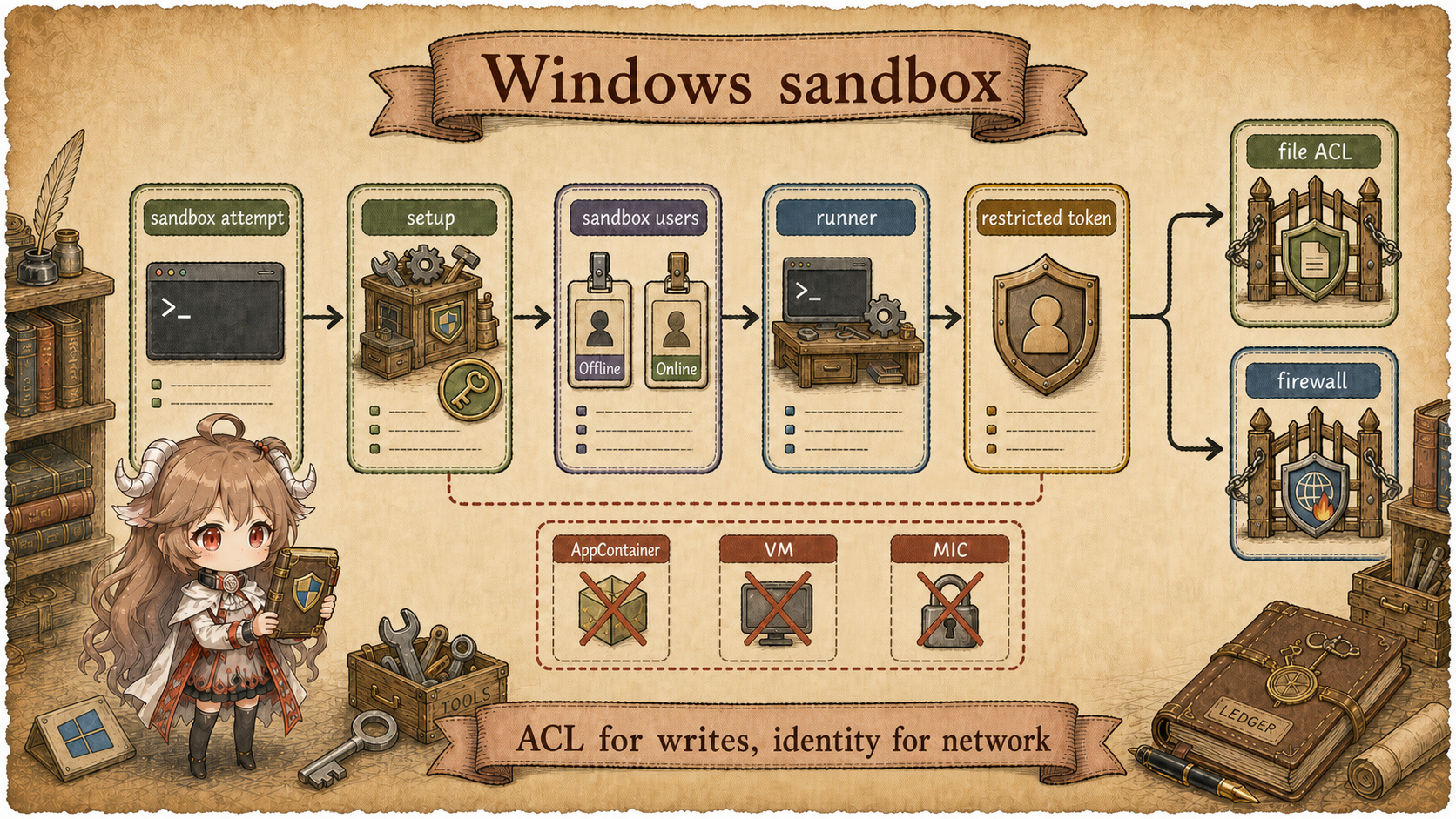
Reading contract. Trace permissions into Windows identities, ACLs, network rules, and command processes; distinguish resumable setup from runtime readiness. Verified on 2026-09-20 against public source the fixed public source snapshot; private service behavior is outside scope.
In the product, sandboxing can look like a switch: allow workspace writes, block the network, ask for approval when needed. Source reading has to go one layer lower. A prompt can ask the model to be careful, and a UI can label a run as sandboxed, but the machine is protected only when the operating system receives a boundary it can enforce.
OpenAI's engineering post "Building a Windows sandbox for Codex" frames the problem directly. On macOS, Codex can lean on Seatbelt. On Linux, it can use seccomp and bubblewrap. Windows did not offer one primitive that matched the local coding-agent workflow. Users should not have to choose between approving nearly every command and giving the agent full local access, so Codex had to map its permission model onto Windows security concepts.
The throughline for this chapter is: the Windows sandbox is the operating-system landing layer for permission policy. Codex first decides what authority a tool call should receive. Setup prepares sandbox users, file ACLs, and firewall rules. At execution time, a command runner starts under the sandbox user and launches the real child process with a restricted token.
Reading goal. We follow the Windows local execution path: why existing Windows primitives did not fit, what the unelevated prototype solved and missed, why elevated setup exists, why the command runner must live on the sandbox-user side, and how this all plugs back into the tool-permission story from Part V.
Source scope.
Product background comes from the OpenAI engineering post.
Implementation details come from public openai/codex
source. This article covers the local Windows sandbox backend and
does not infer private remote-execution infrastructure.
1. Reconnect to Part V: Runtime Chooses the Execution Shape
Part V split side effects into several checks. Permission hooks can
inspect or block. Approval policy decides when a human must confirm.
ToolOrchestrator turns a model-requested action into a
reviewed tool invocation and then an attempted sandbox shape. The
exec backend finally starts the command.
By then, Codex knows how the command should run: read-only,
workspace-write, offline, online, or escalated. Windows does not
understand a Rust enum named SandboxAttempt. It
understands users, access-control entries, restricted tokens,
firewall rules, pipes, process handles, and exit statuses.
| Codex runtime decision | Windows needs | Source landing point |
|---|---|---|
| Whether this command may write the workspace. | File-system ACLs and a restricted token. | workspace_acl.rs, token.rs. |
| Whether this command may reach the network. | A principal that firewall rules can identify. | sandbox_users.rs, firewall.rs. |
| How the child process starts and reports output. | A runner process, pipes, ConPTY or stdio. | runner_client.rs, command_runner/win.rs. |
| How failure reaches the user and retry loop. | Spawn result, exit status, and streamed output. | exec.rs, unified_exec. |
This table translates "permission" from product vocabulary into materials the OS can apply. The Windows API names that follow exist to move one of those materials into place.
2. Why Existing Windows Isolation Primitives Did Not Fit
The engineering post walks through three candidates. AppContainer offers strong application-container isolation, but it belongs to a packaged-app model and does not naturally host arbitrary command lines, compilers, and project folders. Windows Sandbox provides a temporary VM, which provides strong isolation but is heavy for per-command agent work. Mandatory Integrity Control can lower process integrity and restrict some writes, but it does not by itself express the workspace-write and network combinations Codex needs.
| Candidate | What it provides | Why it did not become the main path |
|---|---|---|
| AppContainer | Application-container isolation. | It is a poor fit for arbitrary CLI tools, build systems, and existing project directories. |
| Windows Sandbox | A temporary VM boundary. | The startup, file mapping, and interaction costs are too high for ordinary tool calls. |
| MIC | Lower-integrity execution and some write restrictions. | It helps, but it does not fully model Codex's file and network permission profile. |
Codex needs restrictions that stay close to the user's development environment. Commands run in the actual repository. They can read sources and dependencies. Writes are narrowed to permitted roots. Network access is blocked by default, with explicit online and proxy cases. That is a set of constraints around a normal developer workflow, not simply a request to place the process in a heavy box.
3. The Unelevated Prototype: Writes Were Tractable, Network Was Not
The first prototype in the OpenAI post avoided administrator
privileges. The core idea was simple: create a restricted token for
the child process and use file ACLs to decide which paths it could
write. The current source still shows that direction through
CreateRestrictedToken, restricting SIDs, and flags such
as WRITE_RESTRICTED.
CreateRestrictedToken(
    base_token,
    DISABLE_MAX_PRIVILEGE | LUA_TOKEN | WRITE_RESTRICTED,
    ...
)
File access fits that shape reasonably well. Codex can grant write
access to workspace roots and add explicit deny rules for control
directories. workspace_acl.rs protects subdirectories
such as .codex and .agents so a sandboxed
child cannot damage the agent's own control plane.
Network access was the weak point. The prototype could route programs through proxy environment variables and replace common network binaries, but those controls depend on cooperation. A process that opens sockets directly can bypass them. Without an elevated setup step, Codex did not have a principal that Windows Firewall could reliably use for descendants of the sandboxed command.
The unelevated prototype established the key split: file writes can be narrowed with ACLs; firewall rules need a user identity they can recognize. That is why the redesign introduces two sandbox users and firewall rules tied to those users.
4. Elevated Setup: Turn Network Policy into User Identity
The redesigned path starts by preparing local security materials through an elevated setup step. The two usernames are explicit in the source:
const OFFLINE_USERNAME: &str = "CodexSandboxOffline";
const ONLINE_USERNAME: &str = "CodexSandboxOnline";
CodexSandboxOffline is the default offline identity.
CodexSandboxOnline is the identity used when network
access is allowed. Setup creates or refreshes these local users,
generates random passwords, protects the secrets with DPAPI, and
writes them to sandbox_users.json. It needs elevation
because creating local users, adjusting ACLs, and managing firewall
rules are system-level operations.
This makes Windows enforce the network permission. Firewall rules can block outbound traffic for the offline user. If a local proxy is configured, Codex can add loopback exceptions to the proxy ports. The online user is reserved for commands that were explicitly allowed to access the network. The child process no longer needs to voluntarily honor proxy environment variables for the main network restriction to work.
| Setup material | What it protects | Why it must exist before command launch |
|---|---|---|
CodexSandboxOffline |
Default offline execution identity. | Firewall rules can block outbound network by user. |
CodexSandboxOnline |
Explicit online execution identity. | Network authority becomes an identity choice, not an env-var convention. |
| Workspace ACLs | Writable roots, read-only roots, denied roots. | The file system must know which SIDs can write before the child starts. |
| Firewall rules | Offline outbound blocking and proxy exceptions. | Network policy must be active before the process can connect. |
Setup is therefore not just "installing a sandbox executable." It configures operating-system controls: ACLs for files, principals for the network stack, and prepared identities that the runner can select at command time.
4.1 Setup Also Checks Runtime Selection and Resource Ownership
Security provisioning has conditional entry paths. run_elevated_setup_with_proxy_settings reconciles registered Core through an authenticated sandbox service. That route requires a successful service response and does not silently fall back to legacy setup. The legacy route instead invokes the elevated helper; these are alternatives, not two installations performed for every command.
Registered runtime must also establish resource ownership. RuntimeRegistration records package family, two sandbox account SIDs and aliases, metadata roots, and ready_package. Readiness is committed only after both account registrations and metadata grants succeed. can_resume_registration() means registration can continue, not that a command may execute. Setup also checks the user SID, installation directory, and package family, and refuses resources still being retired.
Runtime selection:
  Legacy     -> elevated helper provisions resources
  Registered -> authenticated service checks ownership and provisions

Registration state:
  record ownership -> register accounts and grant metadata -> ready_package
  resumable registration != permission to execute
5. Command Runner: The Real Child Starts from the Sandbox Side
One problem remains after setup. The Codex parent process usually runs as the real user. It needs the final command to start as a sandbox user, while still receiving stdin, stdout, stderr, terminal resize events, and the exit code.
The source splits this into two stages. runner_client.rs selects the runner path for the current runtime, creates pipes, and uses CreateProcessWithLogonW to start it under the sandbox user; registered Core also uses a verified app execution alias. The runner reads SpawnRequest, derives a restricted token from that user’s token, and starts the real command using ConPTY or ordinary stdio.
Codex parent
  -> CreateProcessWithLogonW(sandbox user, command runner)
  -> send SpawnRequest over pipes
  -> runner creates restricted token
  -> runner launches the real command
  -> stdout/stderr/status stream back to Codex
The extra hop solves both identity and interaction. The final
command is born inside CodexSandboxOffline or
CodexSandboxOnline, so firewall and ACL rules apply.
Codex still observes the command lifecycle: it can write stdin,
read output, handle resize, wait for termination, and write the
result into protocol events and rollout records.
6. Back to the Codex Runtime: What the Platform Sandbox Protects
Now place this back on the Part V tool path. The model never directly receives authority to run commands. It requests a tool. Codex turns that request into a reviewable invocation, evaluates hooks and approval policy, chooses a sandbox profile, and then lets the Windows backend translate that choice into an OS-enforced process boundary.
| Layer | Question it answers | How failure is reported |
|---|---|---|
| Approval / hooks | Is this side effect allowed? | Reject, ask for approval, or emit an explainable event. |
SandboxAttempt |
Which permission profile should this command receive? | Try a narrower or wider shape; trigger retry when appropriate. |
| Windows setup | Does this machine have enforceable local boundaries prepared? | Report missing setup, elevation failure, or unsupported environment. |
| Command runner | Did the real child start under the right user and token? | Spawn failure, pipe failure, exit status, and captured output. |
| Events / rollout | Can clients and recovery code see what happened? | Structured event, tool output, and retry or diagnostic material. |
The Windows sandbox is therefore not a detached security appendix to the Codex series. It is the platform implementation of the permission-and-sandbox chapter: runtime policy chooses the shape, setup prepares users and rules, the runner launches commands under the selected identity, and events plus rollout record the result.
7. Common Misreads When Reading This Code
First, the sandbox is not a prompt constraint. Prompting can guide the model, but commands need OS enforcement once they leave the model loop. Second, it is not a full VM. Codex wants to run normal development commands in the user's current repository, so the restrictions stay close to the workspace and user identities. Third, setup success does not mean every command will succeed; it only means the local security materials exist. Each run still depends on the chosen permission profile, paths, network mode, and runner state.
A useful final test is to ask five questions for any model-requested command: why was it allowed, which user identity launched it, where can it write, can it reach the network, and who can see the evidence if it fails? The Windows sandbox layer exists to hand those answers to the operating system.