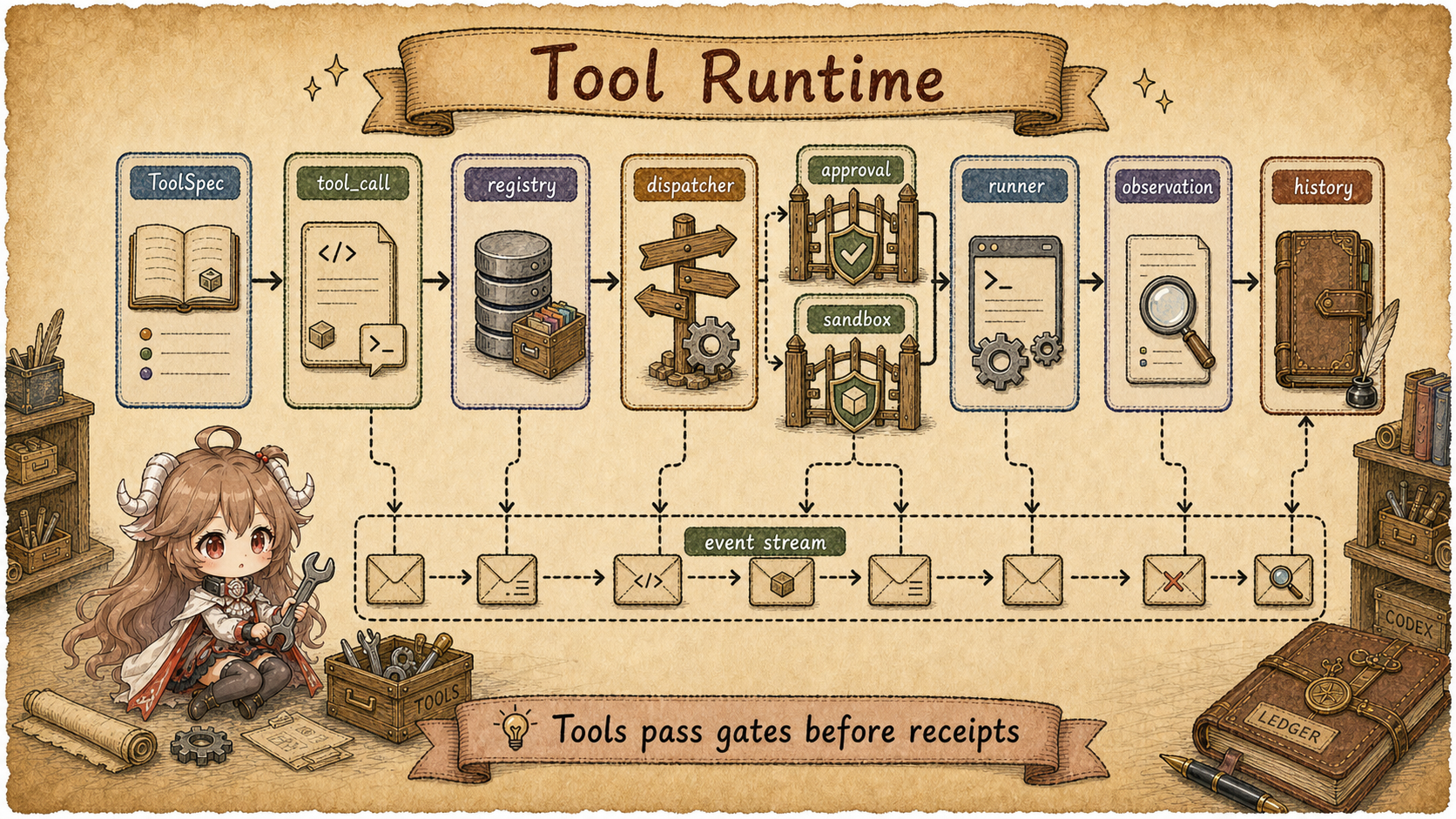
Reading contract. Follow the menu, invocation, and result record to distinguish visibility, permission, and completion. Verified on 2026-09-20 against public source the fixed public source snapshot; private service behavior is outside scope.
Start with a normal action: the model wants to run tests. In the UI this looks like a shell tool call. In the source, several questions appear at once. Why was shell visible in this sampling request? How is the model's call parsed? Who decides whether it can run in parallel? Where do approval and sandbox checks happen? If the tool fails, what does the model see next?
That is the reading route for Codex tools. Do not begin with a tool inventory. Follow one request from beginning to end: a tool starts as a model-visible spec, returns as a model call, becomes a runtime invocation, and leaves output plus events behind.
Keep four objects in view:
ToolSpec is the model-visible menu;
ToolRouter is the router captured for that sampling step;
ToolInvocation is the runtime execution request;
ResponseInputItem is the tool result shape returned
to the next model call.
Source scope.
This article describes only the tool construction, routing, execution,
and recording logic visible in the public openai/codex source. Terms
such as tool menu, router, execution request, and result record help
distinguish source objects including ToolSpec,
ToolRouter, ToolInvocation, EventMsg,
and ResponseInputItem. It does not infer private model
service behavior or private deployment-specific tools.
This part follows six questions:
- Where does the tool menu for each model request come from?
- Why is the model-visible tool list not the same as the runtime registry?
- How does a model function call become a
ToolInvocation? - Where do parallelism, cancellation, hooks, and lifecycle notifications attach?
- Why do approval and sandboxing belong to the runtime path, not to the model output?
- How does a tool result flow back to the model, clients, and history?
1. Split "Tool" Into Layers
The word tool is overloaded. It can mean a schema in the model request, a shell executor, apply_patch, MCP, plugins, dynamic tools, multi-agent collaboration tools, or tools discoverable later through tool search. The source becomes readable only after separating model visibility from runtime dispatch.
| Layer | Source Object | Responsibility | Common Misread |
|---|---|---|---|
| Model menu | ToolSpec |
Describe how the model may request tools in this sampling request. | Treating schema visibility as execution authority. |
| Runtime index | ToolRegistry |
Map tool names to handlers and capability metadata. | Assuming hidden-from-model means absent from runtime. |
| Step router | ToolRouter |
Parse model outputs into tool calls and dispatch them. | Missing direct, deferred, code-mode-only, and hidden exposure. |
| Execution request | ToolInvocation |
Carry session, step context, call id, cancellation, diff tracking, and payload. | Thinking handlers receive only model arguments. |
| Returned evidence | ToolOutput / ResponseInputItem |
Normalize results for the next model call and history. | Looking only at terminal output. |
Together, these layers provide guarantees that can be checked in the source. The model proposes an action; the runtime verifies the tool name, parallel capability, hooks, approval, and sandboxing, then decides what output shape returns to the model.
2. The Tool Menu Is Captured for Each Model Request
Each model request uses a StepContext containing its model, settings, environments, MCP binding, and tool_router. built_tools prepares discoverable plugin suggestions and calls build_tool_router; build_prompt places router.model_visible_specs() in Prompt.tools.
The menu can therefore change between sampling steps within a turn. ToolCallRuntime retains the originating Arc<StepContext>, so a delayed call still uses the settings and environment that advertised it.
For example, a test request produced after seeing exec_command must retain the execution environment selected for that step. A later configuration update may affect the next step; it must not silently redirect a queued command to another environment.
3. Model Visibility and Runtime Registration Are Separate
ToolRouter keeps registry separate from model_visible_specs. build_tool_router creates a ToolRegistry constrained by allowed tools, adds core, MCP, extension, and dynamic runtimes, then calls finalize_tool_router to derive the model menu. Hosted model specs join that final assembly.
ToolExposure distinguishes direct, deferred, code-mode-only, and hidden tools. Registration does not make a tool accessible from every call source. The direct model menu and code-mode surface are derived separately from the same registry; the existence of a handler does not prove model visibility or authorization.
Command execution provides a concrete example. add_shell_tools registers ExecCommandHandler and WriteStdinHandler when UnifiedExec is enabled. Managed requirements that disable it instead select ExecCommandHandler::one_shot, without resumable processes or write_stdin. The current path no longer retains a legacy shell handler as a dispatch-only compatibility entry.
4. A Model Call Becomes a Runtime Invocation
When the model stream contains a tool call, Codex does not execute raw
JSON. ToolRouter::build_tool_call
parses response items into ToolCall: function calls become
named tool payloads, client-side tool search calls become tool-search
payloads, and custom tool calls keep their custom input.
The router’s dispatch_tool_call_with_terminal_outcome wraps the call in ToolInvocation. It includes the session, step_context, cancellation token, diff tracker, call id, tool name, source, and payload. The handler reads its originating turn and environments through that step context before registry dispatch.
Shape sketch:
  model function_call
      ↓
  ToolRouter::build_tool_call(...)
      ↓
  ToolCall { tool_name, call_id, payload }
      ↓
  ToolInvocation { session, step_context, cancellation_token, tracker, source, payload }
      ↓
  ToolRegistry dispatch
5. Registry Owns Hooks, Lifecycle, and Normalized Output
ToolRegistry records name collisions and applies allowed-tools checks to external tools. finalize_tool_router turns collisions into construction errors when error_on_tool_collisions is enabled. Dispatch validates the name, source, and payload; an unavailable call produces a RespondToModel error instead of silently failing.
Registry also wraps handler execution. It first runs pre-tool-use hooks, which can block or rewrite input. Successful admission is followed by lifecycle start where the tool does not manage that notification itself, then handler execution. Afterward it records telemetry, runs post-tool-use hooks, adds context or adjusts model-visible output, and notifies lifecycle finish. The registry therefore does more than name lookup.
6. Parallelism and Cancellation Are Runtime Decisions
A prompt can say the model supports parallel tool calls, but Codex still
controls actual concurrency per tool. ToolCallRuntime
holds a parallel_execution read/write lock and asks the router
whether each tool supports parallel execution.
In
handle_tool_call_with_source,
parallel-safe tools take the read lock; non-parallel tools take the
write lock. Cancellation is handled in the same runtime layer: Codex
either waits for runtime teardown or aborts the task, then creates an
aborted response and notifies lifecycle contributors.
Parallel tool calls mean the model may express parallel intent.
Actual concurrency is narrowed by each tool runtime's capability and
ToolCallRuntime's lock policy.
7. Side Effects Pass Approval and Sandbox Checks
Tools that affect the external environment require additional runtime
checks. The header of
orchestrator.rs
describes it as the central place for approvals, sandbox selection, and
retry semantics. ToolOrchestrator::run
checks approval requirements, selects the first sandbox attempt, and
runs the tool.
If the sandboxed attempt is denied, the retry path uses denial details, network policy, approval policy, and tool escalation rules to decide whether to request approval again and which retry sandbox to use. The model's request and the real side effect are therefore separated by runtime authority checks.
8. Results Return to the Model, Events, and History
Tool results first need a model-visible shape.
FunctionToolOutput,
ApplyPatchToolOutput,
and
ExecCommandToolOutput
implement to_response_item, producing ResponseInputItem.
Shell output includes wall time, exit code or session id, token counts,
and truncated output text.
Client progress comes through the event layer. Tool events include
emit_exec_command_begin
and ToolEmitter variants for shell, apply patch, and unified
exec. Extension lifecycle contributors receive start and finish through
notify_tool_start / notify_tool_finish.
The turn flow records history. ToolCallRuntime::handle_tool_call produces a ResponseItemEnvelope with execution metadata; drain_in_flight collects the futures and calls record_conversation_items. A session id means the process is still running, not that its tests have finished: later output and exit status establish completion.
9. Rules To Carry Forward
| Observation | Source Question | Handle |
|---|---|---|
| The model can call a tool. | Is it direct, deferred, code-mode-only, or hidden? | Separate model_visible_specs from ToolRegistry. |
| The model emits a function call. | Which ToolPayload does it parse into? |
ToolRouter::build_tool_call. |
| A tool starts running. | Which turn-level data does the handler receive? | ToolInvocation. |
| Tools appear to run in parallel. | Does each runtime support parallel calls? | ToolCallRuntime read/write locking. |
| A command is approved, sandboxed, denied, or retried. | Did it enter the orchestrator path? | ToolOrchestrator::run. |
| A tool returns output. | What shape is seen by the user, the model, and history? | EventMsg, ToolOutput, ResponseInputItem. |
The full path is now visible: the current step captures the tool list; the prompt exposes model-visible specs; the model returns a call; the router creates an invocation; registry dispatches it with hooks and lifecycle; side-effecting handlers pass approval and sandbox checks; outputs return to the model, event stream, and history.
The next part can now focus on authority: where approval policy, permission hooks, sandbox policy, and exec policy each intercept a tool that wants to touch processes, files, or the network.