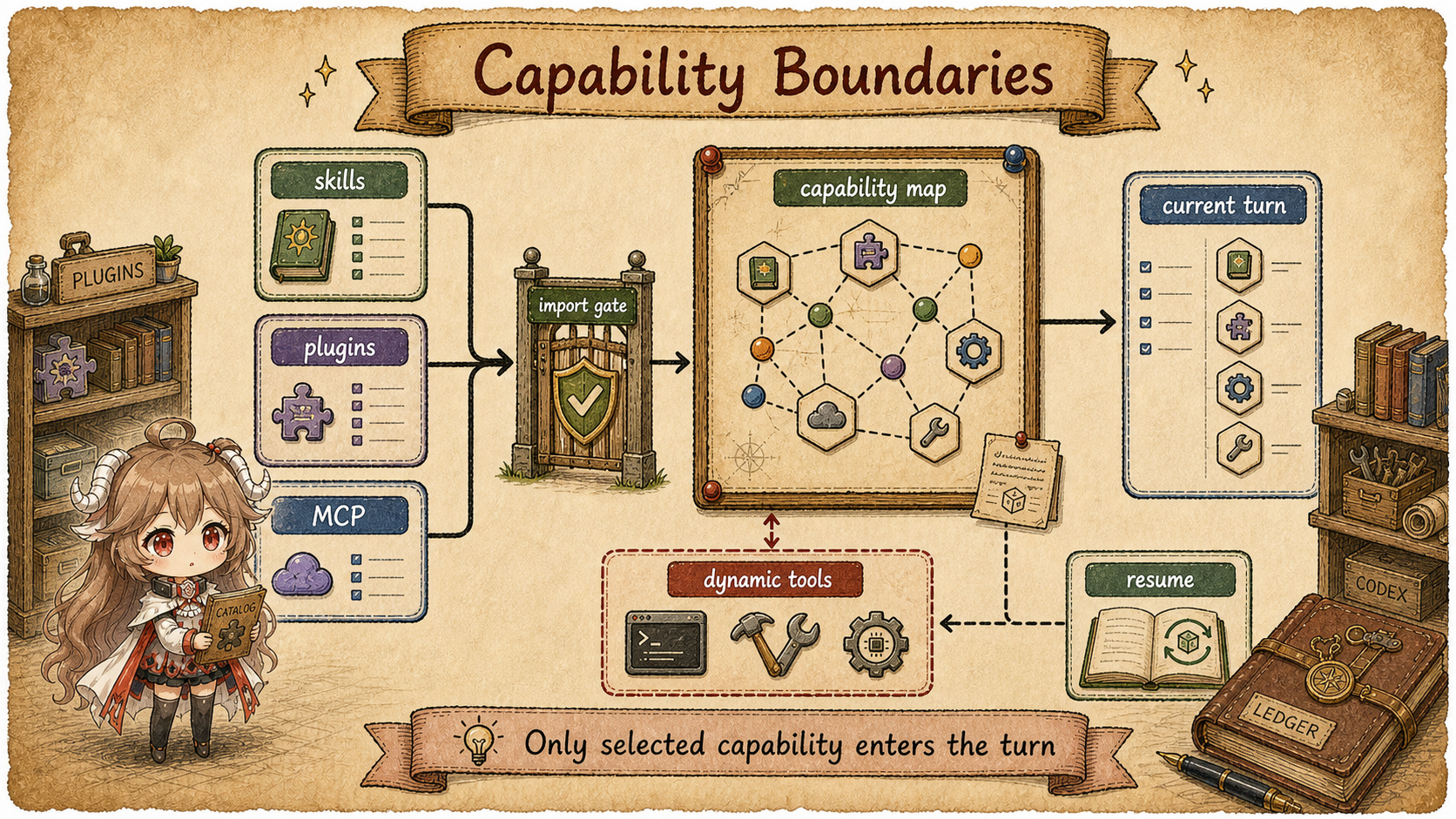
Reading contract. Track skill instructions, plugin resources, tool specs, and child threads through their separate reading and execution paths. Verified on 2026-09-20 against public source the fixed public source snapshot; private service behavior is outside scope.
Start with a familiar workflow. You ask Codex to write an article,
explicitly invoke $article and $image,
keep Browser and GitHub plugins enabled, expose a large MCP tool
set, and maybe spawn a subagent to review the draft. All of that is
"capability" in everyday language, but the source does not treat it
as one blob.
Codex separates the mechanisms. A skill adds instructions to context, a plugin declares related resources, MCP contributes tool specs, and a subagent creates another thread. Each path still serves the same user turn, but different code handles it.
Keep four actions in view: skills add instructions to
context, plugins declare resource roots, MCP
adds specs to the current sampling step's tool menu, and subagents create
child threads managed by the parent task.
Source scope.
This article only describes behavior visible in the public
openai/codex source: skill discovery and injection, plugin
manifests and load outcomes, MCP tool exposure, tool_search,
dynamic tools, the multi-agent tool list, and AgentControl.
References to apps, plugins, and subagents mean those public
runtime structures.
This part follows six questions:
- Why separate context capability, tool capability, and thread capability?
- Which
TurnContextfields receive extension inputs? - How does a skill move from catalog entry to selected main prompt injection?
- How does a plugin package skills, MCP servers, apps, and hooks?
- When are MCP tools exposed directly, and when are they deferred to
tool_search? - Why is a subagent a child thread rather than an ordinary tool result?
1. Four Extensions Use Four Entry Paths
The hardest part of this area is vocabulary. The UI may call many things "capabilities", but the runtime handles them differently.
| Shape | User-facing entry | Runtime entry | Source entry point |
|---|---|---|---|
| Working method | $article, $image, or a structured skill selection. |
The catalog is visible first; selected main prompt content is injected only when selected. | HostSkillsSnapshot, load_skill_prompts. |
| Capability bundle | Browser, GitHub, Documents, and other plugins. | The manifest declares skills, MCP servers, apps, and hooks; loading produces effective roots and summaries. | PluginManifest, PluginLoadOutcome. |
| Callable tool | MCP server, app connector, or dynamic tool. | Converted into model-visible tool specs; large tool sets can be deferred behind tool_search. |
apply_mcp_tool_exposure_policy, ToolSearchHandler, ToolRouter. |
| Parallel work unit | spawn_agent, send_message, wait_agent. |
Creates or resumes a child thread with copied runtime settings and inter-agent communication. | AgentControl, multi-agent handlers, SessionSource::SubAgent. |
Keep this table close while reading the code. A skill answers "how should this work be done?", a plugin answers "which package owns these abilities?", MCP answers "what can the model call?", and a subagent answers "does this need a separate context track?".
1.1 Follow One Turn Through Those Shapes
Use one realistic request as the representative unit: "use
$article to write the Codex memory chapter, use
Browser if a page must be checked, and ask a subagent to review
the draft." Codex does not merge that into one universal
capability. At turn start, the request is split into bounded
runtime materials.
| Stage | Unit at that moment | Module and visibility | What changes next |
|---|---|---|---|
| Raw input | User text plus explicit mentions. | The input layer recognizes $article, Browser, and subagent intent. |
It selects entries to prepare; it does not produce tool results. |
| Capability snapshot | skills_snapshot(), extension_data, and dynamic_tools in TurnContext. |
The runtime stores it for this turn. | Preserves skill sources; the current step captures the tool menu. |
| Context injection | The selected SKILL.md content for $article. |
Model-visible guidance. | It changes how the model should work; it is not a function call. |
| Tool exposure | Browser or other MCP/app tool specs. | The model sees direct tools or deferred tools retrieved through tool_search. |
Actual calls still pass through the tool router and permission layer. |
| Child thread | A review task created by spawn_agent. |
The parent starts it; the child owns its own context and event stream. | Results return to the parent through inter-agent communication. |
This sequence is more useful than vocabulary alone. A single request can involve skills, plugins, MCP, and subagents, but they take effect at different layers. Once you separate context injection, tool exposure, and child-thread control, the source has a clear path to follow.
2. TurnContext Holds the Inputs
Extension inputs have two lifetimes. TurnContext retains dynamic_tools, extension_data, multi-agent settings, and a HostSkillsSnapshot. Each sampling request captures its own StepContext with model, environments, MCP binding, settings, and tool router.
The turn’s skill snapshot and the step’s advertised tools are not one immutable capability list. The snapshot supports selected instruction reads; MCP exposure and extension contributors participate in step-level tool planning. An emitted call retains its originating step even when later menus change.
3. Skills: Catalog First, Full Text on Demand
Catalog and selected text remain distinct. AvailableSkillsInstructions supplies the catalog and usage as a developer fragment; SkillInstructions supplies selected content as a user fragment. Their role, content kind, and markers differ.
Reading now goes through the skills extension and host snapshot. build_skills_and_plugins collects explicit mentions and calls skills_snapshot.load_skill_prompts. The extension contributor also assembles a source-aware catalog and reads selected main prompts from providers, covering host, executor, bundled, and orchestrator sources. Not every skill is a directly readable local file.
| Stage | Context material | Boundary |
|---|---|---|
| Catalog | Name, description, source, and read entry. | A metadata budget bounds length; full prompts are not preloaded. |
| Explicit selection | Main prompt read from its provider. | Read failures produce warnings; oversized prompts are truncated with a warning. |
| Selected text | SkillInstructions user fragment. | Resource-backed skills include authority, package, and main_resource for subsequent reads. |
For example, $article may refer to a filesystem SKILL.md, while an orchestrator-backed skill requires a resource-reading tool. Both supply working instructions; their retrieval method does not grant tool-execution authority.
4. Plugins Package Several Kinds of Capability
Plugins solve a broader packaging problem. A plugin may contribute
skills, scripts, MCP servers, app connectors, and hooks. In the
source,
PluginManifest.paths
names those components as
separate resources: skills, mcp_servers,
apps, and hooks.
pub struct PluginManifestPaths<Resource> {
    pub skills: Vec<Resource>,
    pub onboarding_skill: Option<Resource>,
    pub mcp_servers: Option<PluginManifestMcpServers<Resource>>,
    pub apps: Option<Resource>,
    pub hooks: Option<PluginManifestHooks<Resource>>,
}
This small source shape is the plugin mental model. A plugin manifest groups several resources under one package identity; it does not collapse skill context, MCP tools, app connectors, and hooks into one new kind of runtime ability. The loader still routes each resource to its own channel.
After loading, PluginLoadOutcome exposes effective
skill roots, plugin skill roots, MCP servers, apps, hook sources,
and capability summaries. A summary is a compact model-facing
description. The actual capability still enters through its own
path: skill context, MCP tool, app tool, or hook.
The plugin instructions make this distinction explicit: a plugin is a local bundle of skills, MCP servers, and apps. Solving work still means using the underlying skill, MCP tool, or app tool.
build_skills_and_plugins loads plugins from the current
config, resolves explicit plugin mentions, and, when needed, loads
raw MCP/app inventory for the turn. build_plugin_injections
then turns a plugin mention into guidance about the package's
currently usable abilities.
5. MCP and tool_search: Discover Before Loading Everything
After MCP registration, apply_mcp_tool_exposure_policy resolves where each tool appears. It merges server and app-connector omit_tools_from settings and subtracts those surfaces from ToolExposures::ALL. direct_only_tool_namespaces also removes deferred and code-mode exposure from the selected namespaces.
When search is enabled, deferred exposure is allowed, and the current tool mode supports the combination, the runtime removes direct exposure; otherwise it removes deferred exposure. The decision no longer uses a 100-tool threshold. Configuration and tool mode produce Direct, Deferred, CodeModeOnly, Hidden, or the corresponding model-only variants.
Shape example (unrelated settings omitted):
MCP tool + search enabled + deferred allowed -> deferred
same tool + omit_tools_from contains deferred -> direct (if allowed)
all exposures omitted                        -> hidden
finalize_tool_router registers tool_search only when search is enabled and at least one deferred tool has search information. The schema returned by discovery still goes through tool routing and approval when invoked; finding a capability does not bypass execution restrictions.
6. Subagents Add a Controlled Thread
Multi-agent operations are exposed through tools:
spawn_agent, send_message,
followup_task, wait_agent, and
list_agents. Their effect is different from a normal
function result. A spawned agent becomes a child thread managed by
AgentControl.
handle_spawn_agent parses task_name, agent_type, model, reasoning_effort, and fork_turns. It builds child configuration from the originating step_context, carries forward permitted environment and permission settings, and validates model and role overrides.
The spawn path uses SessionSource::SubAgent and
ThreadSpawn metadata. When history is forked, it reads
parent history and keeps all turns, the last N turns, or none,
depending on fork_turns. Completion is reported back
to the parent through InterAgentCommunication in the
v2 path, or by injecting a parent-thread message for older paths.
A subagent is a controlled thread, not just a function call. It has its own context, status, history, and completion notification, while still inheriting the originating parent step's runtime settings.
7. Rejoin the Main Turn
The four paths now connect back to the series map. User input
enters a turn; TurnContext retains extension inputs, while StepContext captures settings, environments, and the tool menu for the current sampling request;
skill and plugin guidance become contextual injection; MCP,
dynamic tools, and collaboration tools enter the tool plan; tool
calls, agent activity, and model output continue into events and
client event conversion.
| What you see | Where to read | Series connection |
|---|---|---|
| "Use $article for this post" | collect_explicit_skill_mentions, then SkillInstructions. |
Part II: context management. |
| "Enable Browser or GitHub plugin" | Manifest and load outcome, then contributed skill roots, MCP servers, and apps. | This part's plugin packaging, plus Part IV tools. |
| "Search the tool catalog first" | apply_mcp_tool_exposure_policy and ToolSearchHandler. |
Part IV: tool specs and routing. |
| "Spawn a reviewer subagent" | Multi-agent handlers, AgentControl, and SessionSource::SubAgent. |
Part III events and Part VI client event conversion. |
Seen this way, Codex extensions are not an external plugin layer bolted around the runtime. They are bounded inputs to the same turn: context when the model needs a working method, tool specs when it needs callable capability, and child threads when the work needs a separate context track.
8. The Series Map After Part VII
With seven parts in place, a single request can be read end to end: entry converts user intent into typed operations; session creates a turn; context management prepares model-visible material; tool specs and routers define the callable tool list; permission and sandboxing check side effects; events carry runtime facts to clients; extensions and multi-agent explain how extra capability joins that same path.
Part VIII follows hooks and lifecycle. Before or after a
user prompt, before or after a tool call, and when a turn stops,
Codex allows more code to add context or intercept side effects.
At that point, the hooks entry in a plugin manifest
becomes an execution path.
Source References
- openai/codex · 5c5308fc9a9e
- StepContext
- HostSkillsSnapshot / environments
- build_skills_and_plugins
- skills extension / selection / prompt reading
- AvailableSkillsInstructions / SkillInstructions
- PluginManifestPaths
- effective plugin resources
- MCP exposure policy
- deferred search registration
- subagent spawn / fork mode
- AgentControl