Part I followed one task through the runtime. Part II separated long-lived memory files from transcript. This chapter starts after that split: the word context
is overloaded. In Claude Code it can mean project memory, user instructions, repository status, visible conversation messages, hidden runtime metadata, compact summaries, or API request blocks. Reading the code becomes easier once those locations are separated.
durable transcript → evidence and resume records
base context → cached system environment and user instructions
model request → selected and normalized messages
pressure relief → replacement, collapse, or compact
recovery → installed summary and replay stateReading goal: follow one long coding session from durable history into the next model request. Track who selects messages, which conditions enable each pressure-relief path, how a summary becomes an installed recovery point, and what files or skills are restored afterward.
The evidence is the public mirror’s fixed March 31, 2026 snapshot, linked at one immutable commit. It is not Anthropic’s official source repository and does not establish behavior in later product versions. Visible client implementation, official API contracts, and provider-side inference remain separate. Missing feature modules are described only through their visible callers and recovery records.
1. Context starts before the chat history
The initial user and system context are built outside the model loop. User memory can come from CLAUDE.md files and related memory sources. System context captures repository status at conversation start. Both builders are memoized: inserting their results each turn does not reread git or disk each turn. The date belongs to the cached user-context result as well.
1.1 Insert the working environment in the correct place
appendSystemContext() and prependUserContext() place those facts in different positions. The former appends to the system prompt; the latter creates a meta user message with a <system-reminder> wrapper. The wrapper name does not change its message role.
shape-level:
system = default system prompt + gitStatus + optional cacheBreaker
messages = [
  meta user: "<system-reminder> ... CLAUDE.md ... currentDate ...",
  ...runtime-selected messages
]1.2 Stored history and the provider request have different jobs
| Location | Reader or transformation | What it preserves |
|---|---|---|
| UI / REPL history | Display components | Human scrollback; not copied wholesale to the API. |
| Durable transcript | Session storage and resume | Evidence and recovery records, selected again when loaded. |
| Runtime view | Compact-boundary slicing, snip, collapse | The active working history for this request. |
| API view | Normalization and cache breakpoints | Provider-valid messages, tool-result pairing, and cache markers. |
The /context command aims to report what the model actually sees. Before sending, normalizeMessagesForAPI() also removes display-only virtual messages, filters system records, merges consecutive user messages, handles unavailable tool references, and removes problematic media blocks from affected meta messages after oversized-media errors. Human-readable wrappers need not be legal provider message parameters.
2. The query loop rebuilds the model-visible view
Inside query(), the runtime constructs the current API view. It does not blindly replay the whole transcript. It starts after the latest compact marker, applies the tool-result budget, lets HISTORY_SNIP lower historical pressure when that feature is present, runs microcompact, replaces committed Context Collapse spans with summaries, and only then asks whether auto compact must take over.
That difference explains a common surprise: a message can be visible in local history, present in transcript storage, and still absent from the next API request. Context management is a selection problem.
2.1 Pressure is handled in order
active history → messages after latest compact boundary
→ tool-result budget: evaluate new results
→ snip (if enabled): filter selected middle UUIDs
→ microcompact: time-based clear OR cached edits OR unchanged
→ collapse (if enabled): substitute committed span summaries
→ auto compact (if threshold reached) → assemble API requestContext pressure arrives from multiple directions. Tool results can be large. Repeated edits can create bulky replacement state. Long reasoning chains add assistant blocks. System and memory context consume prefix space before the conversation even begins. The runtime therefore has several valves, not one big summarizer.
2.2 Snip and microcompact handle local pressure
Microcompact is a smaller valve. It is used to control high-pressure parts of the prompt without forcing a full user-facing compact. The source separates three cases that are easy to blur together. HISTORY_SNIP runs before microcompact and returns a tokensFreed estimate so later auto-compact checks do not overcount the surviving assistant usage.
What does snip do? It is not a clock-based deletion of the oldest prefix. If the first user message contains the task, constraints, and acceptance criteria, deleting from the beginning would lose the point of the session. Claude Code already has compact markers for prefix replacement. Snip is the smaller operation for selected middle ranges inside the active context.
Who decides that a range is low-value? The public code shows that Claude Code conditionally registers SnipTool, adds stable [id:...] tags to API-bound user messages so Claude can reference exact messages, and injects a context_efficiency attachment after enough context growth without a snip. So low-value
is not a visible timestamp heuristic in the public source. It is a model-participating context-retention decision: which middle messages are no longer critical for the task, file state, tool references, or user constraints, and can therefore leave the next model-visible view.
Not this:
  U0(initial task) A1 T1 A2 T2 ... A80 T80
  -> delete the oldest N messages by age

Closer to the behavior visible in source:
  API-bound copy:  U0[id:a1] A1 T1 U2[id:b7] ... U80[id:k9]
  snip record:     removedUuids = [uuid(T12), uuid(A13), uuid(T13), ...]
  next API view:   U0 A1 T1 U2 ... [middle range filtered] ... U80

Local UI / JSONL:
  original messages remain; resume replays the same removedUuids deletion
The selector implementation behind the feature switch is not present in the public TypeScript tree, so the exact SnipTool prompt, scoring rule, threshold, and selector policy are not visible. The surrounding behavior is clear, though. Model-facing paths call projectSnippedView() after slicing at the compact marker, while UI rendering can pass includeSnipped: true so scrollback still shows the full local history. Resume code records removedUuids in the snip record, deletes those middle ranges on load, and relinks parent pointers across the gap. Source comments also say tool-reference-bearing messages are protected from snip. In other words, snip removes selected middle ranges from the next model-visible view; it does not rewrite old tool results into a placeholder and it does not erase the append-only transcript evidence.
Time-based microcompact is the path that replaces old tool results with [Old tool result content cleared]; the client treats a long gap as evidence that cache is cold and a rewrite is expected. That time heuristic does not verify eviction of an actual provider cache entry. Cached microcompact is different again: when cache editing is available, local messages stay unchanged and Claude Code first records pendingCacheEdits. Later, services/api/claude.ts, the Anthropic API adapter inside Claude Code, translates those edits into a cache_edits block while building the provider payload.
This should not be confused with ordinary public prompt caching. Public Anthropic prompt caching is centered on cache_control, cache writes, and cache reads. The source path for cached microcompact additionally requires the feature switch, model support, a firstParty main-thread request, and a cache-editing beta header. So cache_edits is best read as a first-party beta cache-editing capability expressed through the Anthropic Messages API payload, not as a stable field available to every ordinary Messages API caller.
shape-level payload fragment:
  {
    "type": "tool_result",
    "tool_use_id": "toolu_abc",
    "cache_reference": "toolu_abc",
    "content": "..."
  }

  {
    "type": "cache_edits",
    "edits": [
      { "type": "delete", "cache_reference": "toolu_abc" }
    ]
  }
cache_reference names the cached old tool result; cache_edits asks the cache-editing path to delete that reference.The point of cache_edits is reference-based deletion. Claude Code marks cached-prefix tool_result blocks with cache_reference, usually the original tool_use_id. A cache_edits block then says to delete a specific cache_reference. The local transcript still keeps the full tool result, but the provider-side cache view can drop that old result. Inserted edits are pinned to the same user-message position and resent so the request prefix remains stable. The later cache_deleted_input_tokens usage field is used to report how many tokens the provider actually deleted. Snip can still change prompt-cache shape because the provider sees a shorter message sequence, but that is a shorter selected message list, not the placeholder path and not the cache-edit path.
Context Collapse is another read-time replacement, not simply a synonym for full compact. The shape is: archived span summary from the collapse store plus the newer incremental messages after that span. The REPL history and recovery metadata remain outside the API payload. This can change prompt-cache shape when the provider first sees the shorter prefix, but it also creates a smaller stable prefix for subsequent turns and can avoid a more destructive auto compact.
2.3 Collapse substitutes a committed summary at read time
before:
  active messages = M1 M2 M3 M4 M5 M6 M7 M8 M9 M10
  collapse store = C1: summary(M2...M8)
after read-time replacement:
  API-bound view = M1 C1 M9 M10
outside the request:
original REPL history, commit log, staged snapshotapplyCollapsesIfNeeded() runs before auto compact when its feature is enabled. Summary messages belong to the collapse store rather than the raw REPL array. Replacing a detailed span changes the provider-visible prefix; subsequent turns may reuse a new shorter prefix. The selector module is absent from this snapshot, so the example describes the visible replacement contract, not an invented selection algorithm.
2.4 Auto compact is conditional, with room left for recovery
The default threshold subtracts the lesser of the model’s maximum output and 20,000 summary tokens from its context window, then reserves a further 13,000 tokens. Environment overrides can lower the window or threshold. These are snapshot-specific client policies, not a fixed percentage of every model’s window. If compaction is disabled, the blocking check can reject a nearly full request with a prompt-too-long error.
2.5 A fork still sends its uncached task
addCacheBreakpoints() normally marks the final message. For a fire-and-forget fork using skipCacheWrite, it marks the penultimate message, at the end of the shared prefix. The fork-only instruction is still sent and processed as uncached input.
main turn:
  S + M_last(cache_control) → read/write S + M_last
side fork:
  S(cache_control) + F      → read S, do not write the S + F tail
example F:
the compact summary task instruction3. Compact creates a recovery point
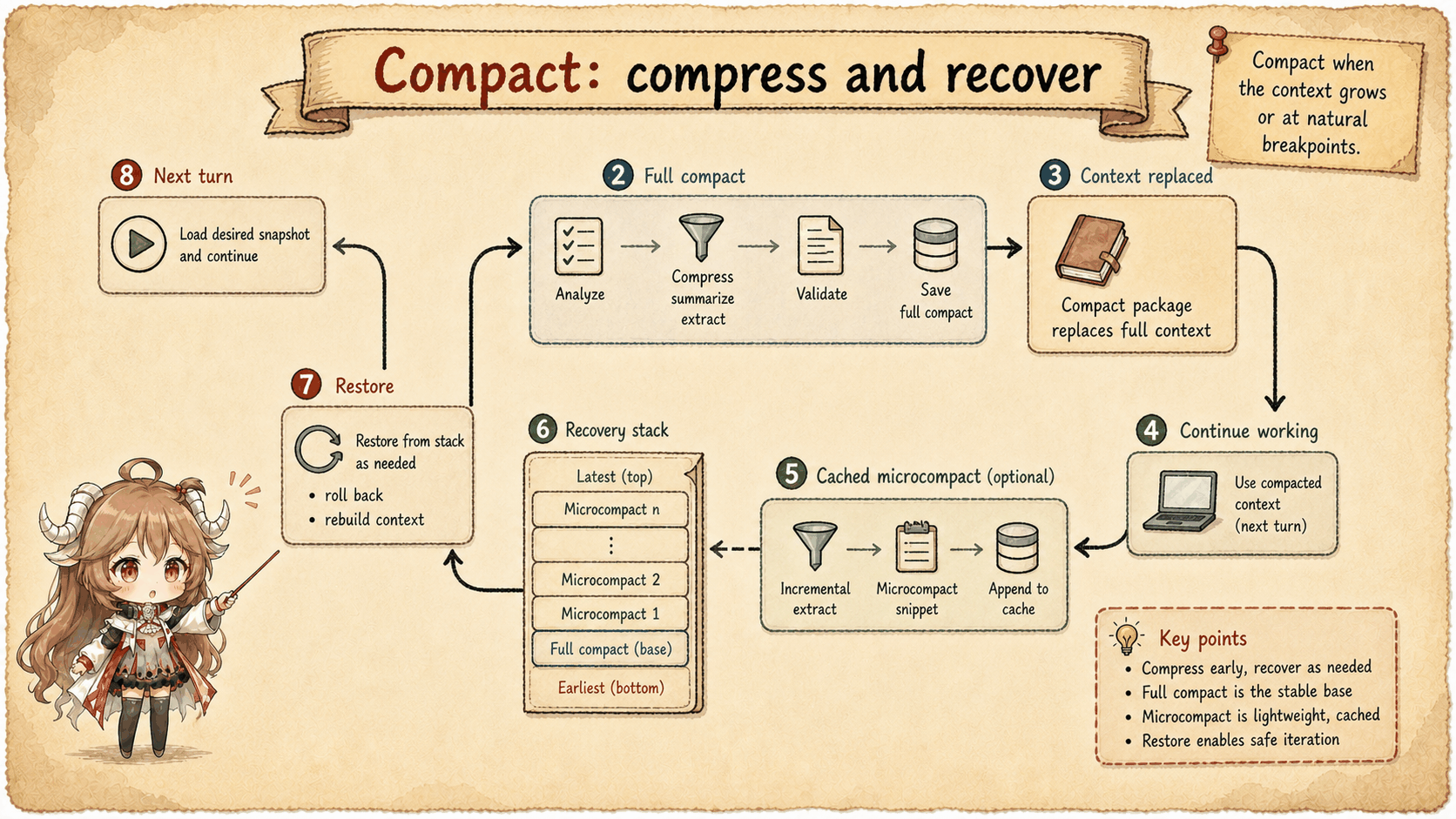
A compact operation writes a boundary and installs a summary user message plus limited recovery material. Manual /compact first slices the active view and tries session-memory compaction when no custom instruction is present. Otherwise it microcompacts and calls compactConversation(). Auto compact checks pressure and consecutive failures, likewise tries session memory, then falls back to full compaction. Successful paths install a new context and perform cleanup.
3.1 Summary generation has two alternative request paths
compactConversation() first runs PreCompact hooks and merges their instructions with the user’s custom instructions. The summary prompt asks for text only: an <analysis> draft followed by <summary>. Summarizing should not create new tool side effects or more work to summarize.
No tool execution does not mean no tool schemas. streamCompactSummary() normally tries a cache-sharing fork first. It preserves the parent’s system, tools, model, thinking configuration, and message prefix, then appends the summary task. maxTurns: 1 bounds the run, skipCacheWrite: true avoids writing its tail, and createCompactCanUseTool() denies every tool execution. Keeping schemas stable does not authorize side effects. Errors or unavailable text lead to the regular streaming path.
cache-sharing fork:
  parent system + tools + thinking + prefix S
  + summary instruction F; all tool execution denied; at most one turn
  read S from cache, avoid writing S + F

gate disabled, or fork failure / no usable text → streaming summary:
  summary-specific system; thinking disabled
  active messages + instruction → filter reinjected attachments → replace media
  retain Read schema; add ToolSearch / MCP schemas when tool search is enabled

expected output: <analysis>...</analysis> + <summary>...</summary>
installation: strip analysis draft, format summary, wrap in summary user message3.2 The fallback rewrites input; oversized summaries can retry
Only the regular streaming path explicitly calls stripReinjectedAttachments() and stripImagesFromMessages(). They remove skill discovery/listing attachments that will be regenerated and replace media with text markers. This path uses a summary-specific system prompt, disables thinking, and caps output. It retains Read and, when tool search is enabled, ToolSearch and relevant MCP schemas. It reads one streamed response without entering the normal tool-execution loop. Applying these rewrites to the shared fork would obscure why that fork can reuse the old prefix.
If the summary request itself is too long, the outer retry drops some of the oldest API-round groups with truncateHeadForPTLRetry(). It updates both ordinary messages and forkContextMessages, so the path actually used receives the smaller input. Retries are bounded; empty summaries and API errors still fail. This fallback loses information. Before installation, formatCompactSummary() removes the analysis draft and formats the summary tags.
3.3 Installation order is recovery order
The successful compact creates a boundary and summary. The summary wrapper explains that work continues from a longer conversation; it can include a transcript location and instructions to resume directly. buildPostCompactMessages() then returns:
post compact messages =
  boundaryMarker
  + summaryMessages
  + messagesToKeep?
  + attachments
+ hookResultshookResults comes from SessionStart(compact) hooks after successful summary generation. PostCompact then receives the summary before the result is returned; its display message is not another set of model-injected hook results. The caller still installs the returned recovery material as active messages.
Paths retaining a suffix annotate its head, anchor, and tail in boundary metadata so resume can reconnect it. Back in query(), the runtime yields these messages and replaces messagesForQuery immediately. The current loop continues with the new context; it does not wait for another user turn.
4. What survives, and what is loaded again
4.1 Runtime definitions and memory have independent lifetimes
System prompts, tool schemas, MCP tools, and agent definitions are rebuilt from runtime inputs rather than rescued from chat history. Memory follows another path: runPostCompactCleanup() clears the main thread’s outer getUserContext cache and resets memory-file caches. Clearing only the inner loader would let the outer memoized value hide the reload and its InstructionsLoaded hooks. Project instructions return because files are loaded again, not because the summary preserved them perfectly.
4.2 File and skill restoration is bounded
Post-compact attachments use the pre-compact file-read state and current tool state to restore selected files, asynchronous agent state, plan-mode material, and invoked skills. The snapshot’s limits are:
| Material | Limit | Consequence |
|---|---|---|
| Restored files | At most 5 | Previously read files are not all replayed. |
| One restored file | 5,000 tokens | Large files may need later reads. |
| Post-compact file budget | 50,000 tokens | This is a ceiling, not a target allocation. |
| Invoked skills | 25,000 tokens | Used skill content is restored within budget. |
Cleanup preserves invoked skill content and does not reset sent skill names merely to emit the full listing again. Full listing reinjection would create cache-write cost; used-skill content and the available Skill tool serve a different purpose. Deferred tools, agent listings, and MCP instruction changes have their own reannouncement rules.
5. Choose the smallest mechanism that preserves continued work
| Pressure | Mechanism | Limit or cost |
|---|---|---|
| Old compact prefix | Boundary slicing | Older detail survives through summary or transcript. |
| Large tool output | Result budget / microcompact | Content may become a preview, placeholder, or provider cache deletion. |
| Selected historical span | Collapse summary | Feature-gated; missing selection code cannot establish policy. |
| Window nearly full | Auto or manual compact | Lossy summary and budgeted restoration. |
| One-off fork task | Shift the cache marker | The task still processes its uncached suffix. |
Context management separates original evidence from the input needed now. UI and transcript preserve history; runtime reloads instructions and definitions; API assembly selects and normalizes messages; compact installs a handoff when losses become necessary. The next chapter follows tool execution, where another set of records enters that same next-request construction.
Sources
The source-code claims in this article are based on the public mirror and the linked official documentation. For server-side behavior and private feature switches, the article states only what the client sends or receives.
- Context builders
- API context insertion
- QueryLoop context selection
- Conditional SnipTool registration
- Snip message ID tags
- Context efficiency snip nudge
- Snip filtering in active message view
- Snip removal replay on resume
- Tool-reference messages protected from snip
- Cached microcompact switch and model support
- Cache editing beta header
- Anthropic API adapter cache edits
- Conversation recovery
- Claude Code memory docs
- Xiaolin Coding context compaction reference (Chinese)